Error check: finance-close-jan-sep-2026.xlsx
Every structural, referential, arithmetic and date problem found in the four sheets (Customers, Invoices, Payments, Summary). The file was opened read-only and has not been changed.
1Headline
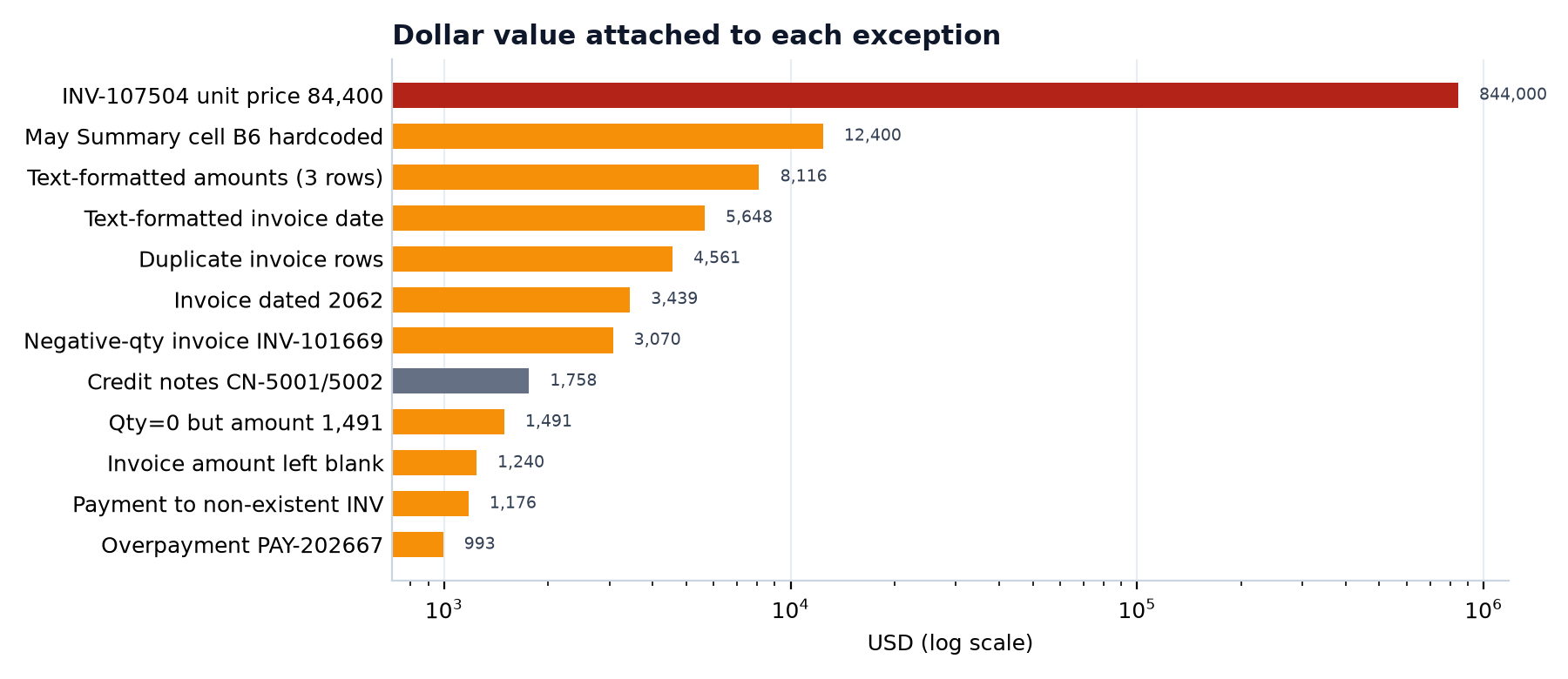
Three things drive almost all of the monetary impact: one invoice priced at 84,400 that inflates revenue by roughly 13% for the quarter, three duplicate rows appended to the bottom of the invoice table, and a hard-typed May total in the Summary that no longer agrees with the underlying data.
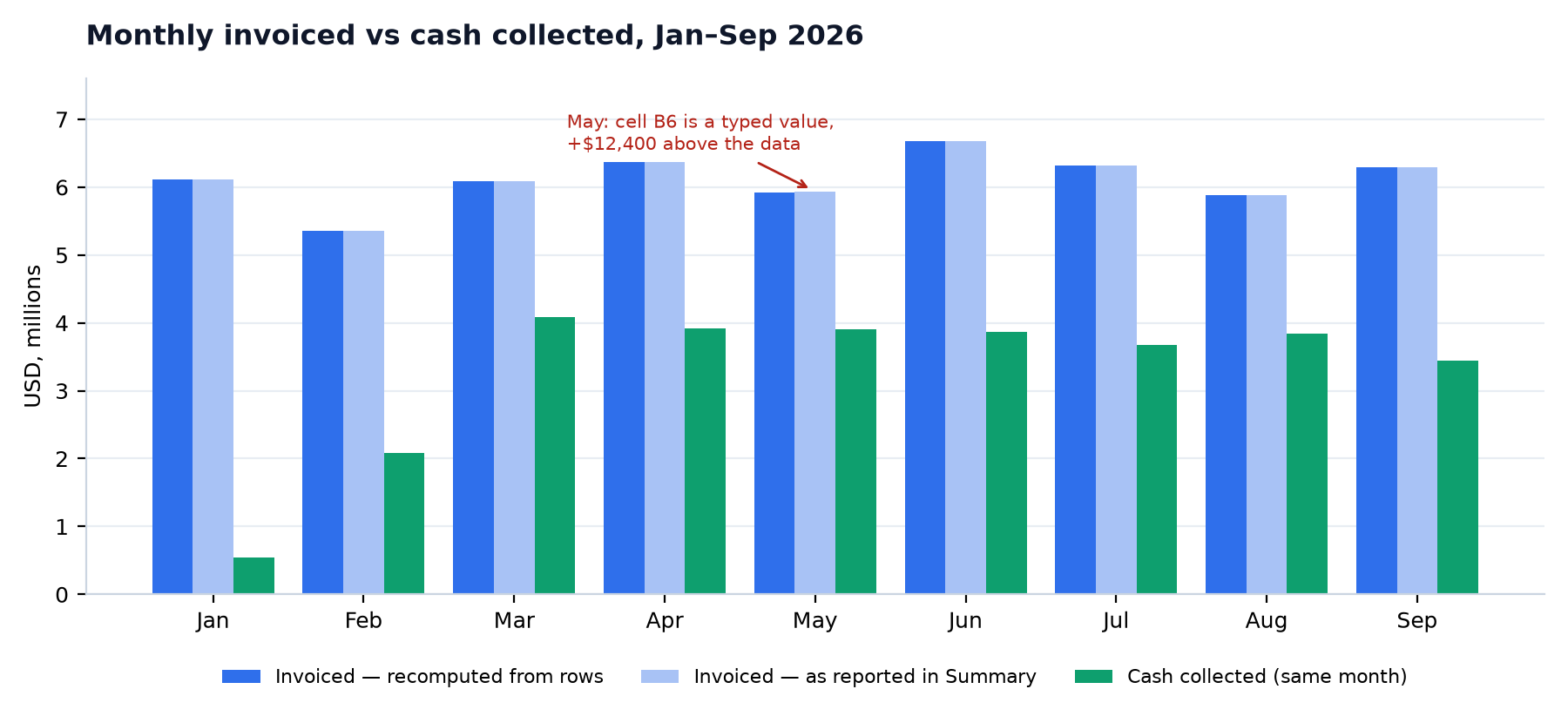
The Summary reports $55,041,639 invoiced. Recalculating the same SUMIFS logic from the invoice rows gives $55,029,239 — a $12,400 gap caused entirely by Summary
B6 being a typed number. On top of that, the formulas cannot see $18,443 of invoice value (text-formatted amounts, a text date, a blank amount and a 2062 date) and do see $4,561 of duplicated rows. The true gross figure is around $55,043,121 before the 84,400 price outlier is resolved.
PAY-200001–PAY-208000). Every populated CustomerID resolves to the matching customer name — zero name mismatches on the 12,000 rows where the ID resolves. All 120 customers have a valid region and payment terms. Categories (4 values) and payment methods (3 values) contain no typos or stray spacing, and every Margin value agrees with (Price − Cost) / Price wherever the denominator is valid. There is no cell containing leading or trailing whitespace, and no hidden rows, columns or merged cells.
2Findings — Invoices sheet
Rows below the header are numbered as in the sheet (the header is row 1). Column references match the header row: A InvoiceID, B InvoiceDate, C CustomerID, E Category, F Qty, G UnitPrice, H UnitCost, I Amount, J Margin, K Region.
| # | Severity | Cell / row | InvoiceID | What is wrong | Value |
|---|---|---|---|---|---|
| 1 | High | A1461 | (blank) | The InvoiceID cell is empty. The row is otherwise complete (2 Feb 2026, C-1040 Juniper Foods, Qty 20 × 62.00, Amount 1,240.00 built by formula). No ID means the row can never be matched to a payment, and INV-101460 is missing from the number series, which suggests this row lost its ID. |
1,240.00 |
| 2 | High | rows 12002–12004 | INV-105994 INV-107977 INV-111599 |
Three rows are appended below the last real invoice (INV-112000, row 12001) and reuse existing IDs. Rows 12002 and 12003 duplicate rows 5995 and 7978 line for line. Row 12004 carries the same ID as row 11600 but different data — C-1023 Nova Logistics, Qty 2, 158.00 versus C-1007 Delta Group, Qty 11, 869.00 — so the ID resolves to two different customers. Revenue is counted twice. |
4,561.00 |
| 3 | Medium | series check | INV-108279 INV-111368 |
The register should run INV-100001–INV-112000 — 12,000 numbers — but only 11,997 distinct numbers are present. These two have no row at all, and the third gap, INV-101460, is the row whose ID is blank (finding 1). Three invoice records are missing rather than merely mis-keyed, so both the count and the revenue are incomplete. |
— |
| 4 | High | I1144 | INV-101143 | Amount is blank; every other row uses =F*G. Qty 11 × 55.00 = 605.00 should be there. Because the cell is empty, SUMIFS skips the row and January revenue is understated. Margin still shows 60%, which proves the price/cost pair was present when the row was keyed. |
605.00 |
| 5 | High | I1579 I3369 I3746 | INV-101578 INV-103368 INV-103745 |
Amounts are text, not numbers: '850.00', '3,096.00', '4,170.00', and the number format has reverted to General. SUMIFS and COUNTIFS ignore text, so this value silently leaves the Summary while the cash side (see finding 21) stays in. The cells also render left-aligned in a right-aligned column — the usual visual tell. |
8,116.00 |
| 6 | High | B7522 | INV-107521 | InvoiceDate is the text string '21/06/2026', not a date, and the cell format is General. Every date-driven formula excludes it, so 5,648.00 never reaches the Summary and the row cannot be aged. The value is also ambiguous — 21 June under dd/mm, 6 invalid month under mm/dd. |
5,648.00 |
| 7 | High | B8063 | INV-108062 | Invoice date is 3 July 2062 — a year typo for 2026. It sits outside every reporting window, so 3,439.00 disappears from the close, and the customer's ageing shows a 36-year-old invoice. The matching payment (finding 22) carries the same wrong year. | 3,439.00 |
| 8 | High | F3405, I3405 | INV-103404 | Qty is 0 while Amount is 1,491.00; 1,491 ÷ 213 = 7, so the quantity was lost. The Amount cell is also hardcoded rather than =F*G, so it will not correct itself when the quantity is restored. The customer paid the 1,491 (PAY-202269), so the invoice is real and the quantity field is the error. |
1,491.00 |
| 9 | Medium | I5946 | INV-105945 | Amount is hardcoded 822.00 against Qty 5 × 201.00 = 1,005.00; revenue is understated by 183.00. Payment PAY-203990 collected 822.00, so the cash followed the wrong figure — either the quantity or the amount is wrong, and one of them must be corrected on both sides. | −183.00 |
| 10 | Medium | I10136 | INV-110135 | Amount is hardcoded 825.00 against Qty 6 × 89.00 = 534.00; revenue is overstated by 291.00. Payment PAY-206765 collected 825.00, again following the wrong figure. | +291.00 |
| 11 | High | G11467, I11467, J11467 | INV-111466 | UnitPrice is 0 while UnitCost is 60.00. Ten units are billed at 0.00, and the Margin formula returns #DIV/0!. Either the price was never entered or this is a free-of-charge line that does not belong in a revenue table. | 0.00 |
| 12 | High | C5960, K5960 | INV-105959 | CustomerID C-9999 does not exist in Customers, so the Region formula returns #N/A. The customer name on the row, Tidal Logistics, does exist — as C-1079, South — so this is almost certainly a mistyped key. | 7,866.00 |
| 13 | High | C6324/K6324 C6820/K6820 | INV-106323 INV-106819 |
CustomerID is blank on both rows. The names resolve to C-1032 (Harbor Industries, North) and C-1099 (Delta Labs, South). Note the Region cells still display "North" and "South", which a VLOOKUP on a blank key cannot produce — the cells are holding stale cached results, so the region on those rows is unverified and any customer-level analysis will drop them. | 8,685.00 |
| 14 | Medium | K4203 | INV-104202 | Region shows #REF! — the VLOOKUP was broken by a deleted reference. The customer is C-1014 Tidal Trading, whose region in Customers is East. Any pivot or SUMIF by region silently loses this row. | 1,450.00 |
| 15 | High | G7505, I7505 | INV-107504 | UnitPrice is 84,400. Every other price in the file sits between 90 and 900 (median 245, 99th percentile 865), and this row's cost/price ratio is a normal 30%, so only the scale is wrong. The resulting 844,000 amount is about 13% of the quarter's entire revenue and it is unpaid. Most likely the price should be 844.00 (or 8,440.00) — a misplaced decimal. | 844,000.00 |
| 16 | Medium | F1670 | INV-101669 | Qty is −5 on a regular invoice row, producing a negative amount of −3,070.00 and a positive 70% margin. Negative quantities are correct on credit notes but not here; either the row is a credit note filed in the wrong place or a sign-typing error. | −3,070.00 |
| 17 | Low | A8280, A11369 | CN-5002 CN-5001 |
Two credit notes live in the invoice table with a CN- prefix and negative quantities, outside the INV- numbering. Nothing in the row identifies them as credit notes, so any count of invoices (Summary column E) or any "invoice" picklist includes them. Confirm they are meant to be here and whether the ID scheme should be standardised. |
1,758.00 |
3Findings — Payments sheet
Columns: A PaymentID, B InvoiceID, C PaymentDate, D AmountPaid, E Method. Every payment in the file is either exactly 100% of the invoice (7,197 rows) or exactly 50% (800 rows) — the two exceptions below break that pattern.
| # | Severity | Cell / row | PaymentID | What is wrong | Value |
|---|---|---|---|---|---|
| 18 | High | B4002 | PAY-204001 | References invoice INV-999001, which does not exist anywhere in the Invoices sheet (real IDs run INV-100001–INV-112000). 1,176.00 is sitting in cash receipts with no receivable behind it — either an invoice is missing from the register or the ID was mistyped. Dated 19 Jul 2026, Card. | 1,176.00 |
| 19 | Medium | row 2668, D2668 | PAY-202667 | Collects 2,233.80 against invoice INV-103969 whose amount is 1,241.00 — 180%. This is the only payment in 8,000 that is neither a full nor a 50% settlement, so either the wrong invoice was referenced or a receipt was entered twice. Card, dated 6 May 2026. | +992.80 |
| 20 | Medium | C3573 C6346 | PAY-203572 PAY-206345 |
Payment date precedes the invoice date: 26 Apr 2026 against an invoice dated 1 May (INV-105303), and 26 Jul against 4 Aug (INV-109491). Either a genuine pre-payment or two mis-keyed dates; both break days-sales-outstanding and any "payment before billing" control. | — |
| 21 | Medium | row 2504 | PAY-202503 | Settles INV-103745, one of the invoices whose amount is stored as text (finding 5). Result: 4,170.00 of cash is in the Payments ledger while the matching receivable is invisible to the Summary — the reported collection rate for that month is distorted on both sides. Same mechanism applies to the other two text-amount rows. | 4,170.00 |
| 22 | Medium | C8001 | PAY-208000 | Payment date is 17 July 2062, the same year typo as its invoice INV-108062 (finding 7). It sits outside the reporting period and outside any ageing bucket, so invoice and payment will never reconcile in a period report. | 3,439.00 |
4Findings — Summary sheet
The Summary is built on SUMIFS/COUNTIFS over Invoices I:B and Payments D:C for rows 2–12004 and 2–8001. The ranges themselves are correct and cover every data row.
| # | Severity | Cell / row | ID | What is wrong | Value |
|---|---|---|---|---|---|
| 23 | High | B6 (May) | n/a | Typed constant, not a formula. B2:B5 and B7:B10 all carry the SUMIFS; B6 holds 5,936,089 with no formula while C6, D6 and E6 still point at it. The data gives 5,923,689, so May — and the nine-month total — is overstated by 12,400.00, and the figure will not refresh if invoices change. | +12,400.00 |
| 24 | Medium | C2:C10, D2:D10 | n/a | Cash columns only span Jan–Sep. 1,104 payment rows dated after 30 Sep 2026 (5,002,200.00) fall outside the model — 1,103 rows / 4,998,761.00 in Oct–Dec plus the 2062 row. "Paid" is therefore period cash, not lifetime collections on the invoices shown, and any comparison to the $55.0m billed is not like-for-like. | 5,002,200.00 |
| 25 | Medium | D2:D10 (definition) | n/a | Outstanding = Invoiced − Paid is a monthly flow difference, not a receivable balance: there is no opening AR, no due-date calculation (Customers.TermsDays is never used anywhere in the workbook) and credit notes are netted into invoiced amounts. It should not be read as AR, overdue debt or a DSO input. | — |
| 26 | Low | E2:E10 | n/a | COUNTIFS counts rows, not distinct invoices: the blank-ID row, the three duplicate rows and the two credit notes are all included (May shows 1,327 while only 1,326 distinct invoices exist that month; July and September are each one too high). The column is labelled "InvoiceRows" but reads as an invoice count. | — |
5Where the money lands
Reconciliation from the reported Summary total to a defensible gross revenue figure for Jan–Sep 2026.
| Line | USD | Ref. |
|---|---|---|
| Nine-month Invoiced as reported (Summary B2:B10) | 55,041,639.00 | — |
| Remove the typed May figure, restore the formula result | −12,400.00 | 23 |
| What the existing formulas actually imply | 55,029,239.00 | — |
| Add invoice value the formulas cannot see: text amounts | 8,116.00 | 5 |
| text-formatted invoice date | 5,648.00 | 6 |
| invoice dated 2062 | 3,439.00 | 7 |
| invoice with a blank amount | 1,240.00 | 4 |
| Remove rows counted twice (duplicate InvoiceIDs) | −4,561.00 | 2 |
| Adjusted gross invoiced, Jan–Sep 2026 | 55,043,121.00 | — |
| Still unresolved: INV-107504 priced at 84,400 (likely 844.00 or 8,440.00) | up to −835,560.00 | 15 |
6Judgement calls — flagged, not counted as errors
These patterns are consistent across the file, so they read as business practice rather than mistakes. They are listed because they affect how the numbers should be read.
- 800 payments are exactly 50% of the invoice (all others are 100%). If half-payments are instalments, the model has no field for the second instalment and nothing shows which invoices are only half settled.
- 4,004 invoices have no payment at all and 3,761 payments arrived after the customer's due date (TermsDays). That is plausible for a nine-month book, but it means "unpaid" cannot be distinguished from "missing payment" without further work.
- 1,103 payments are dated Oct–Dec 2026 — post-period receipts. Legitimate, but they sit outside the Summary entirely (finding 24).
- Credit notes CN-5001 and CN-5002 (finding 17) are treated as credit notes on the evidence of their ID prefix and negative quantities; the workbook itself never labels them.
- Due dates are never computed. Customers.TermsDays is populated (15/30/45/60) but no formula anywhere references it, so no ageing or overdue analysis exists in this model.
- Customer name is stored twice — as a key in Customers and as free text on each invoice row. It happens to agree on all 12,001 resolvable rows today, but nothing prevents drift.
7How the checks were run
Read-only pass with openpyxl against both the formula layer and the cached-value layer, so that stale cached results were visible alongside the formulas.
- Structure — row and column extents, hidden rows/columns, merged cells, sheet state, number formats, and the data type of every cell in every column.
- Keys — duplicate and missing InvoiceIDs and PaymentIDs, ID pattern checks, gaps in the numeric series, orphan foreign keys in both directions.
- Referential — every CustomerID against the Customers master; every InvoiceID referenced by a payment; customer-name agreement; region agreement with a VLOOKUP recomputation.
- Arithmetic — Amount against Qty × UnitPrice for all 12,003 rows; Margin against (Price − Cost) / Price; error values (#DIV/0!, #REF!, #N/A); hardcoded cells sitting inside formula columns.
- Dates — type checks, out-of-period values, payment-before-invoice, and re-derivation of each month's bucket to compare with Summary.
- Distribution — unit-price, quantity and cost/price-ratio outliers; payment-to-invoice ratio distribution (which is how finding 19 was isolated from the 800 legitimate half-payments).
- Controls — SUMIFS/COUNTIFS re-execution per month, and a tie-out of the reported totals to the row-level data (section 5).
- Integrity — SHA-256 of the source file:
484d7111…4b116d; the workbook was opened read-only and written nowhere.
Nothing in the workbook was edited, moved, recalculated or saved. All figures quoted here were computed outside the file.