
Anomaly AI — MCP server
Anomaly AI MCP Server
Connect Claude Code or another AI tool to Anomaly with one URL. Ask a question about your data, and Anomaly runs the analysis and sends back the answer, the numbers behind each chart, and links to what it built.
Server URL
https://mcp.findanomaly.ai/mcp
Anomaly is an AI data analyst for large datasets and spreadsheets. With its MCP server, your AI tool sends Anomaly a question, and Anomaly runs the queries and builds the charts, dashboards and files. Every question also appears as a chat in your Anomaly project, so you can check how each number was calculated.
Listed in the Official MCP Registry and on Glama.
What you need
- An Anomaly account with data in a project: an uploaded Excel or CSV file, or a connected source such as GA4, BigQuery, Google Sheets, MySQL or Snowflake. Sign-up is free.
- An AI tool that connects to remote MCP servers and signs in through your browser. Claude Code is tested end to end.
- Anomaly credits. Each question uses them, the same as asking in the app (see pricing).
Step 1: Add Anomaly to your AI tool
Pick your tool. Every tool uses the same server URL and the same Anomaly sign-in.
Run this in a terminal:
claude mcp add --transport http anomaly https://mcp.findanomaly.ai/mcp
Add --scope user to use Anomaly in every project. Then start Claude Code, run /mcp and choose anomaly to sign in.
In Claude on the web or the desktop app, open Settings → Connectors and choose Add custom connector. Name it Anomaly and paste the server URL:
https://mcp.findanomaly.ai/mcp
Click Connect to sign in. In a chat, turn on Anomaly from the + menu. Custom connectors need a paid Claude plan.
On chatgpt.com, open Settings → Security and login and turn on Developer mode. Then go to chatgpt.com/plugins, click + to add a remote MCP server, choose OAuth and paste:
https://mcp.findanomaly.ai/mcp
ChatGPT sends you to Anomaly to sign in.
Or add this to ~/.cursor/mcp.json:
{
  "mcpServers": {
    "anomaly": { "url": "https://mcp.findanomaly.ai/mcp" }
  }
}
Then click the sign-in button next to anomaly in Cursor’s MCP settings.
Or run this in a terminal:
code --add-mcp '{"name":"anomaly","type":"http","url":"https://mcp.findanomaly.ai/mcp"}'VS Code asks you to sign in the first time the server starts. Use Anomaly from Copilot Chat in Agent mode.
Run this in a terminal:
codex mcp add anomaly --url https://mcp.findanomaly.ai/mcp
Codex opens your browser to sign in. To sign in later, run codex mcp login anomaly.
Add a remote MCP server with this URL and leave any API key field empty:
https://mcp.findanomaly.ai/mcp
To add Anomaly to several AI coding tools at once, run the open-source add-mcp command. It finds the tools on your computer and adds Anomaly to the ones you pick:
npx add-mcp https://mcp.findanomaly.ai/mcp -n anomaly -g
A tool that only accepts an API key, or only runs MCP servers on your own computer, can’t connect to Anomaly’s server.
Step 2: Sign in and allow access
Your AI tool opens Anomaly in your browser. Sign in as you normally do, check the request and click Allow.
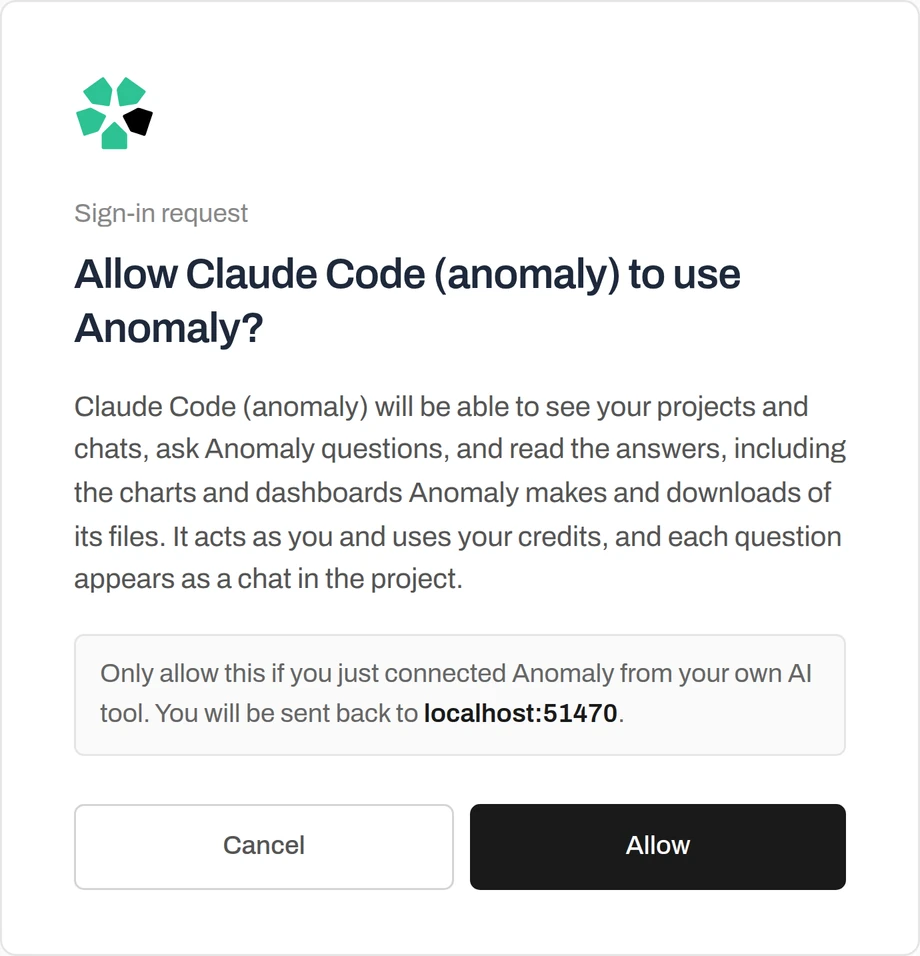
You stay signed in. A sign-in that goes unused for 30 days expires; sign in again the same way.
Step 3: Ask your first question
Ask the way you would ask a data analyst, and start with “Ask Anomaly” so your AI tool sends the question there. For example:
- Ask Anomaly why conversions dropped last week in my GA4 project, and which channels drove it.
- Ask Anomaly to build a dashboard of monthly revenue by region in my sales project and give me the link.
- Ask Anomaly for the top 20 customers by revenue this year as an Excel file I can download.
- Ask Anomaly how it calculated last quarter’s gross margin, and show me the SQL and the rows behind it.
- Ask Anomaly to continue my latest chat in the finance project and split the result by month.
This is a real run in Claude Code on the Superstore sample data:
›Use Anomaly to find which product category had the highest total profit, and how much.
●anomaly · list_projects
Superstore Order Insights (last activity 2026-09-27)
●anomaly · ask_anomaly
question: “Which product category had the highest total profit, and how much?”
Status: complete
Technology had the highest total profit, at $145,250.06.
Created or updated in Anomaly: Insight · Highest Total Profit by Product Category
●Anomaly says Technology had the highest total profit, at $145,250.06. It also saved an insight, “Highest Total Profit by Product Category”, which you can open from the conversation link.
The prompt is shortened; the tool calls and answers are from the run.
Each question appears as a chat in your Anomaly project, where you can open it, check the calculation and continue.
What you get back
- The answer, with a link to open the chat in Anomaly.
- A link to each dashboard, insight or file it created. Files also get a download link that works for 60 minutes.
- Each chart as a picture, plus its numbers and SQL, so your AI tool can quote exact figures.
- Long analyses are fine. Claude Code waits up to about two and a half minutes while Anomaly reports its progress; other tools collect the answer later with get_answer.
An example reply, from a real run on the Superstore sample data:
Status: complete
Open in Anomaly: <link to the chat>

Created one insight with:
- A line chart of monthly sales for 2017
- A table of the top five customers by sales in 2017

The 2017 period is based on ship_date.

Created or updated in Anomaly:
- Insight: 2017 Sales Trend and Top Customers
  Open in Anomaly: <link to the insight>
Trimmed. The reply also carries each chart’s definition, SQL and rows, and a picture of the chart.
Tools
list_projectslists the projects you can use in Anomaly, including shared ones, and can search by name.list_conversationslists the chats in a project, including ones started in the Anomaly app.ask_anomalyasks Anomaly’s analyst a question, in a new chat or as a follow-up. Anomaly runs the queries and builds the charts, dashboards and files.get_answercollects an answer that is still being worked on, or the latest answer in a chat.
Sign-in and your data
- Your AI tool signs in through Anomaly and acts as you. It sees only the projects you can open in Anomaly.
- Each question runs as a normal Anomaly chat, with the same access checks, and uses your credits.
- Your AI tool receives what Anomaly sends back: project and chat names, answers, chart data and links. Anomaly’s own instructions and internal tools are never exposed.
- Connect only to
https://mcp.findanomaly.ai/mcp, and only click Allow for a connection you just started. - To disconnect Claude Code, run
claude mcp remove anomaly. In other tools, remove the server in their MCP settings.
Read the privacy policy and the security overview.
Frequently asked questions
Do I need an API key?
No. Your AI tool opens Anomaly’s normal sign-in in your browser, and you approve the connection there. There is no key or token to copy.
Does using Anomaly through MCP cost extra?
There is no separate fee. Each question uses your Anomaly credits, the same as asking it in the Anomaly app.
Which AI tools work with the Anomaly MCP server?
Claude Code is tested end to end. Other tools that can add a remote MCP server by URL and sign in through the browser (OAuth) connect the same way.
Will I see these questions in Anomaly?
Yes. Each question appears as a chat in the project, with the dashboards, insights and files it made, so you can check the logic behind every number and continue in the app.
My AI tool says the server needs authentication
Sign in again from your AI tool. This also happens when a sign-in has gone unused for 30 days.
The sign-in page says the request has expired
A sign-in request is valid for 10 minutes. Start it again from your AI tool.
The reply says “working”
Anomaly is still analyzing. Ask your AI tool to collect the answer with get_answer, or open the chat link to follow it in Anomaly.
No projects are listed
Create a project in Anomaly and upload or connect your data first.