Bank Reconciliation: Worked Example With Practice Files
Learn bank reconciliation step by step with downloadable practice files. Match transactions, calculate adjusted balances, and investigate differences.
Anubhav Pandey··15 min read
September’s bank statement closes at $9,548. The cash ledger closes at $10,200. Both describe the same business account, yet they are $652 apart.
Bank reconciliation explains that gap by comparing the transactions behind each balance. In this synthetic example, a deposit and a payment cleared after month-end, while a fee and interest are missing from the books. Those items explain part of the difference. A $125 debit remains unresolved.
The reconciliation statement below shows what can be explained and what still needs evidence. Its two adjusted balances remain different; the later steps trace each adjustment and investigate the unmatched records.
Read the reconciliation statement first
Here is the result for the operating account at 30 September 2026. The report was prepared using evidence available by 5 October.
Bank side
USD
Book side
USD
Closing bank balance
$9,548
Closing cash-ledger balance
$10,200
Add deposit in transit, L11
+$1,400
Add unrecorded bank interest, B11
+$8
Subtract outstanding payment, L10
−$900
Subtract unrecorded bank fee, B10
−$35
Adjusted bank balance
$10,048
Adjusted book balance
$10,173
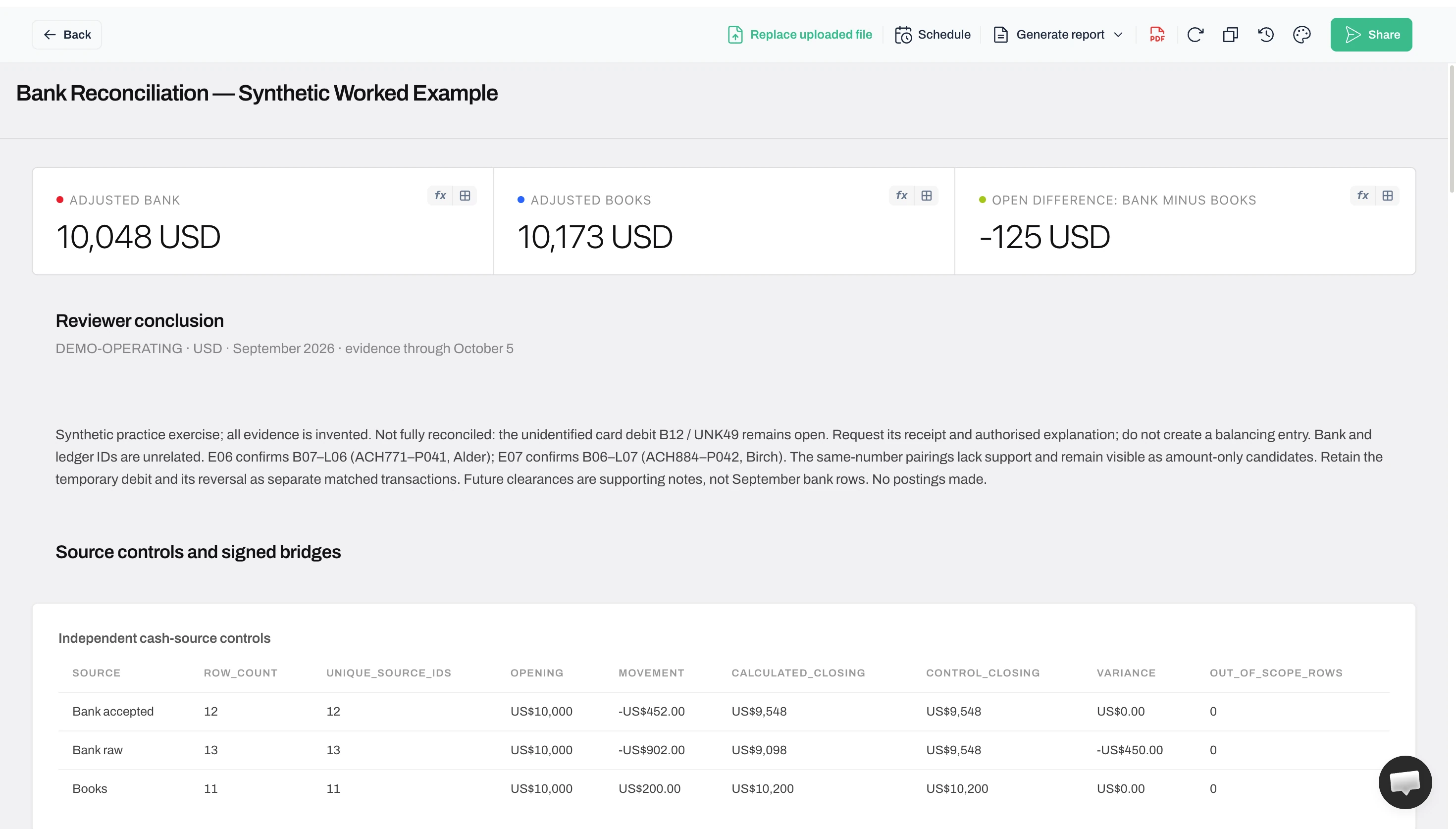
Remaining difference: $10,048 − $10,173 = −$125. Status: incomplete. The bank side is $125 below the book side. An unidentified bank debit, B12, remains open; no accounting correction has been posted.
All figures and supporting notes are synthetic. We ran the three source CSVs in FindAnomaly.ai, inspected its exported results and compared them with separately prepared calculations. The app captures and exported-report views below come from that same run.
The $1,400 deposit and $900 payment explain bank-side timing differences. The $8 interest and $35 fee are proposed book adjustments. They bring the balances closer, but leave the reconciliation incomplete. This statement format keeps the account, currency, cutoff, source references, adjustments and review status together.
The review keeps the unexplained $125 visible
The report keeps B12 open and requests evidence. No balancing entry was posted. First-party Anomaly screenshot, 23 October 2026; synthetic practice data. Click to enlarge.
What are you reconciling?
The bank statement is the bank’s record of transactions and balances. The cash-account ledger, or cash book, is the business’s record for that account. The reconciliation statement is the report explaining their differences. AccountingCoach’s explanation describes the two records and their adjustments.
Create a cash-flow report from bank transactions
To explain where cash came from and where it went, start with the accepted bank transactions, then classify the movements. Keep this report alongside the reconciliation: one explains movement; the other compares the bank with the books.
Choose the account, currency and period. Retain the opening and closing bank balances, import the dated transactions, and remove only evidenced export duplicates. Preserve both sides of a reversal.
Use a signed Amount column: receipts positive, payments negative. Add Source ID, Date, Description, Category and Evidence columns. Retain the original description and reference.
Classify each movement using the underlying records. Customer receipts and ordinary operating payments belong in operating activity; asset purchases or disposals in investing; borrowing, repayment of loan principal and owner funding in financing. Split mixed payments where evidence supports the components. Interest and dividends require the policy applicable to your reporting framework; their label alone does not settle classification.
Leave unexplained payments in an explicit Unclassified row until resolved. For a combined report across your own accounts, pair and eliminate internal transfers from both sides; for one account, retain them as transfers so that account’s balance still reconciles. Do not treat a loan receipt as sales.
In Excel, select the transaction table, choose Insert → PivotTable, place Category in Rows and Amount in Values, and confirm that Values uses Sum. Group Date by month if needed. Show receipts, payments and the signed net movement, then check opening cash + net movement = closing cash.
For an Amount range B2:B13 containing this example’s 12 accepted bank rows, receipts are =SUMIF(B2:B13,">0",B2:B13) and signed payments are =SUMIF(B2:B13,"<0",B2:B13). They give $5,048 and −$5,500; the net is −$452, and $10,000 − $452 = $9,548. B12’s −$125 remains in both cash movement and Unclassified until its purpose is supported. Excluding it would incorrectly produce a $9,673 closing balance.
That creates a bank-based cash-movement report. To issue a complete accounting statement of cash flows, include every relevant cash and cash-equivalent account, complete the operating/investing/financing classifications, eliminate internal transfers, separate any exchange-rate effect and reconcile to the financial statements under the applicable standard. A single bank export cannot supply missing accounts or evidence. The cash-flow reporting guide expands the classification and reporting method.
01. Fix the scope and check both source totals
Use one account, one currency and one reporting period. This example covers the synthetic DEMO-OPERATING account in USD, from 1–30 September. Both sources begin at $10,000, with no outstanding items brought forward from the prior reconciliation.
Download the worked-example package. In a new Anomaly project, upload only bank-export.csv, cash-ledger.csv and supporting-evidence.csv from its downloads/ folder. Keep the prepared matching decisions, reports and expected outputs separate so you can check the result yourself. The package is a fixed practice exercise, not a blank Excel formula template.
Supply the account, currency, reporting period, 5 October evidence cutoff, both $10,000 opening balances, closing controls and absence of prior outstanding items. We supplied those controls in the prompt. The recorded analysis instructions ask Anomaly to validate sources, match using evidence, calculate the reconciliation and expose unresolved items. A condensed version is:
Check each source against its closing balance and preserve duplicate decisions. Confirm one-to-one matches using references and supporting notes; do not reuse rows. Show signed adjustment calculations and unmatched records in both directions. Cite the source and evidence IDs, keep unexplained amounts open, and do not post entries or force agreement.
Keep the original exports and give every row a stable source ID. Bank IDs begin with B; ledger IDs begin with L. B01 and L01 are independent identifiers, not matching keys. Retain the bank transaction identifier too.
Use positive amounts for cash in and negative amounts for cash out of the company account. Verify the export’s debit/credit meaning; those labels may reflect the bank’s perspective.
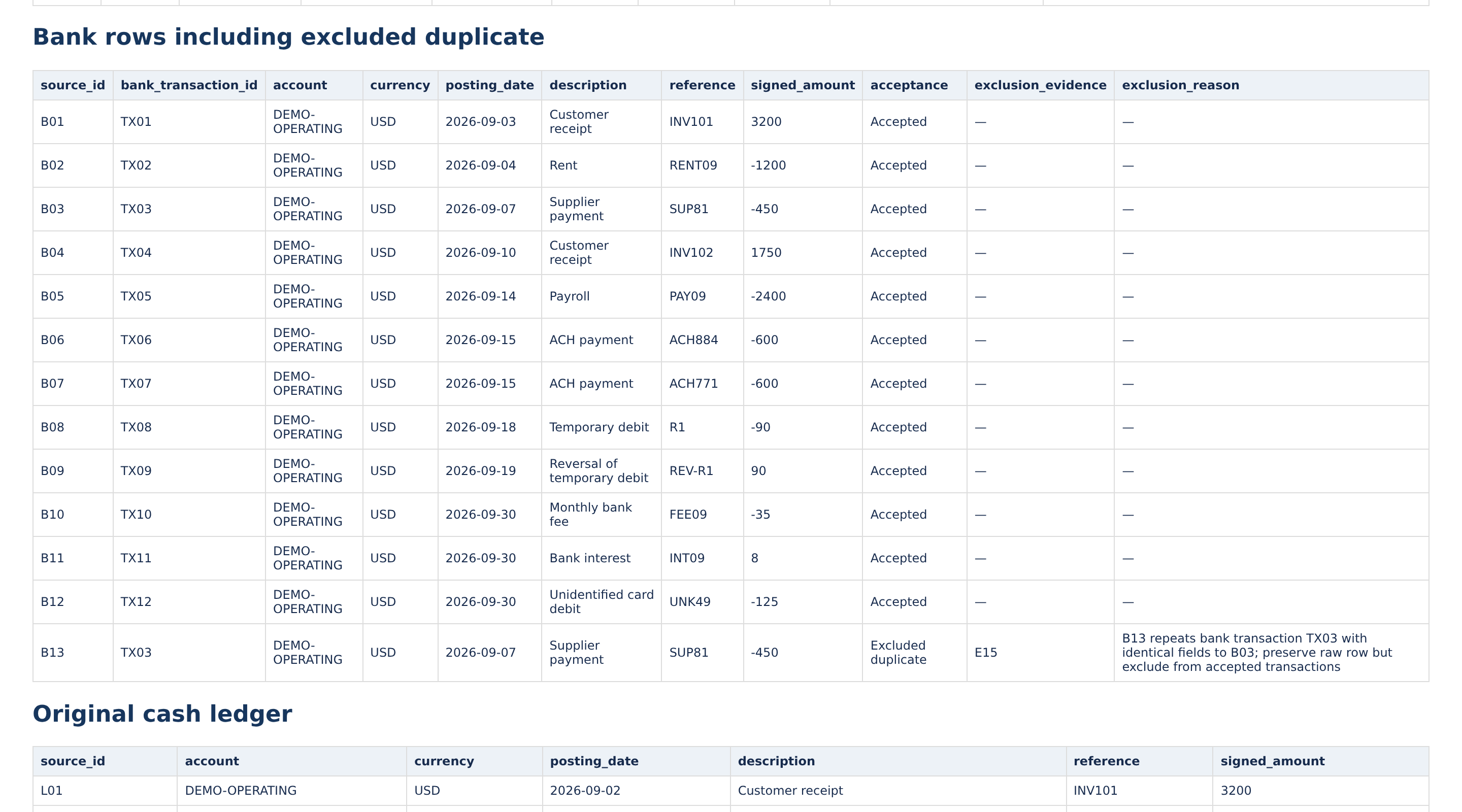
The bank export contains a deliberate problem. B13 repeats B03’s bank transaction identifier, TX03, with identical transaction fields. Counting both produces a $9,098 closing balance, $450 below the statement control. Preserve B13 in the audit record, mark it as an export duplicate and exclude it from accepted transactions. Do not remove two genuine payments merely because their amounts agree.
After that exclusion, check each source independently:
Source
Opening balance
Money in
Money out
Calculated closing balance
Bank: 12 accepted transactions
$10,000
$5,048
$5,500
$9,548
Books: 11 ledger entries
$10,000
$6,440
$6,240
$10,200
Calculate opening balance plus money in minus money out, then compare it with that source’s closing control. An incomplete export cannot validate itself. If the control fails, investigate missing pages, duplicate imports, date filters or the wrong account before matching.
In Anomaly: the generated bank-review table retains all 13 rows and marks B13 as the excluded duplicate, citing E15. The accepted bank total and the 11-entry book total then agree with their supplied closing controls.
Inspect the excluded duplicate without deleting its history
Anomaly-generated HTML report export, unchanged: B13 remains with its exclusion reason and E15. Synthetic practice data; locally rendered report, not the app interface. Click to enlarge.
How it was checked: the external Python Decimal and Node integer-cent calculations independently reproduce the $9,548 and $10,200 closing controls. They also preserve the raw bank failure at $9,098. These checks test the supplied exercise; they do not authenticate real bank documents.
02. Compare records and confirm what belongs together
When you compare two Excel sheets and highlight differences, first decide what the sheets represent. Two workbook versions can be compared by cells or changed records. A bank export and a ledger are independent records of financial events: their row order, descriptions and posting dates can differ.
Compare two Excel files and highlight differences
For two versions of the same export, use the following workbook check before reconciling. In Microsoft 365 or Excel 2021 or later, open both files and copy their data into sheets named Old and New in a review workbook. Put the stable transaction key in column A and the signed amount in B. Preserve IDs as text and confirm each key is unique within its sheet; repeated amounts are not unique keys.
On a third sheet named Compare, combine both key lists in column A and use Data → Remove Duplicates on that key list only. This union ensures that deleted and added records both appear.
In B2 and C2, use the exact-match formulas below for the old and new amounts, then fill down. Extend the ranges to include every source row.
Select the populated comparison rows, choose Home → Conditional Formatting → New Rule → Use a formula, enter =$B2<>$C2, and select a fill colour. A changed amount or one-sided “Missing” value highlights the row.
Repeat the paired lookup and comparison for date, reference and other fields that matter. Use =NOT(EXACT(B2,C2)) for a text comparison where case matters. Matching amounts alone do not establish that two records are unchanged.
For an isolated check, Old contains X01=100 and X02=200; New contains X01=100, X02=210 and X03=50. X02 highlights as changed, X03 as added, and X01 stays unchanged. These are illustrative workbook values, not changes to the reconciliation data. Validate required amount cells before lookup: a blank source amount can be returned as zero. Microsoft documents XLOOKUP’s exact-match mode. The Excel file-comparison guide covers other workbook layouts.
A bank and a ledger are independent records, so the Old/New version check does not establish their matches. Continue below with references and supporting evidence; do not look up B IDs directly against L IDs.
Prepare comparable account, currency, signed amount, date and reference fields. Use a shared payment or invoice reference where available, then inspect supporting records. Put differences into an exception table with both source IDs.
B01 records a $3,200 receipt on 3 September; L01 records it on 2 September. Both cite INV101, confirmed by the synthetic remittance note. The evidence supports the match despite the date difference.
Use three clear states as you work:
Candidate: the records might belong together, but evidence is insufficient.
Supported match: the evidence connects the records, their amounts agree and neither row has already been used.
Unresolved exception: a difference or ambiguity remains open, with the next check recorded.
In this one-to-one exercise, each supported match consumes one bank row and one ledger row once. Reusing a row can hide another transaction. A date window helps find candidates; it does not confirm them.
Try the equal-amount trap
Two bank payments on 15 September are both $600. Two ledger payments on 14 September are also $600. Pairing rows in their displayed order gives plausible amounts and dates, but the wrong suppliers.
Source row
What the source says
What the supporting payment record establishes
B06
−$600, ACH884
Birch payment P042, recorded at L07
B07
−$600, ACH771
Alder payment P041, recorded at L06
L06
−$600, Alder, P041
Settled as ACH771, recorded at B07
L07
−$600, Birch, P042
Settled as ACH884, recorded at B06
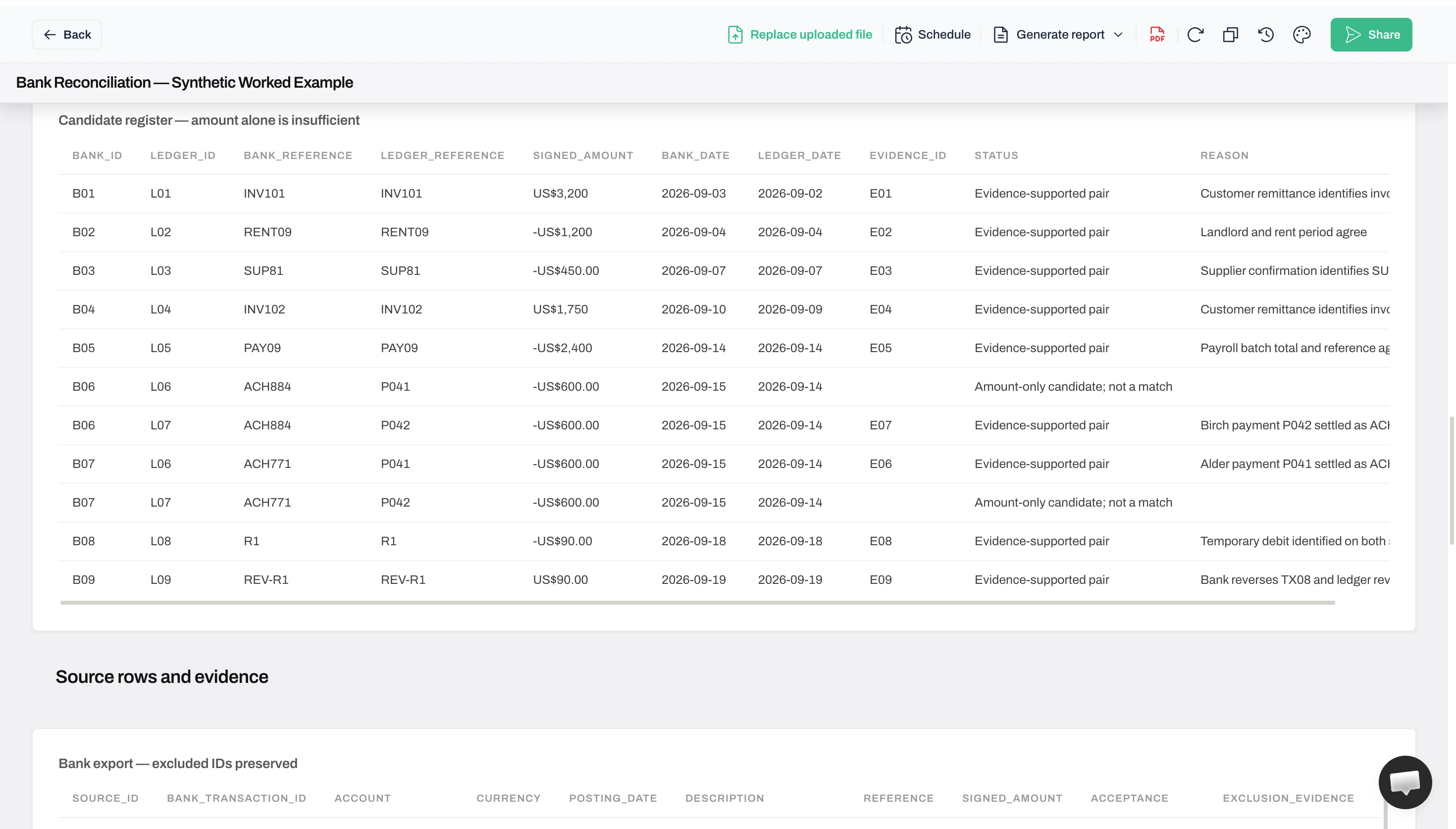
The supported pairs are B06–L07 and B07–L06. B06–L06 and B07–L07 remain unsupported. Wrong pairings leave the totals unchanged, so a balance check misses the mistake. Do not sum the candidate register: it contains alternative uses of the same rows.
If the payment records were unavailable, keep all four rows unconfirmed. Do not guess which supplier was paid. In the actual run, Anomaly had the supporting notes: it generated the correct cross-pairs and retained the unsupported alternatives as candidates. We did not run the evidence-withheld version in the product.
How it was checked: all nine Anomaly-supported pairs agree with the prepared evidence-based register and use each source row once. In a separate offline check, withholding the two payment confirmations leaves all four $600 rows unconfirmed while preserving the same balance difference.
Equal amounts remain candidates until evidence supports them
The unsupported $600 candidates remain visible beside evidence-supported cross-pairs. First-party Anomaly screenshot, 23 October 2026; synthetic practice data. Click to enlarge.
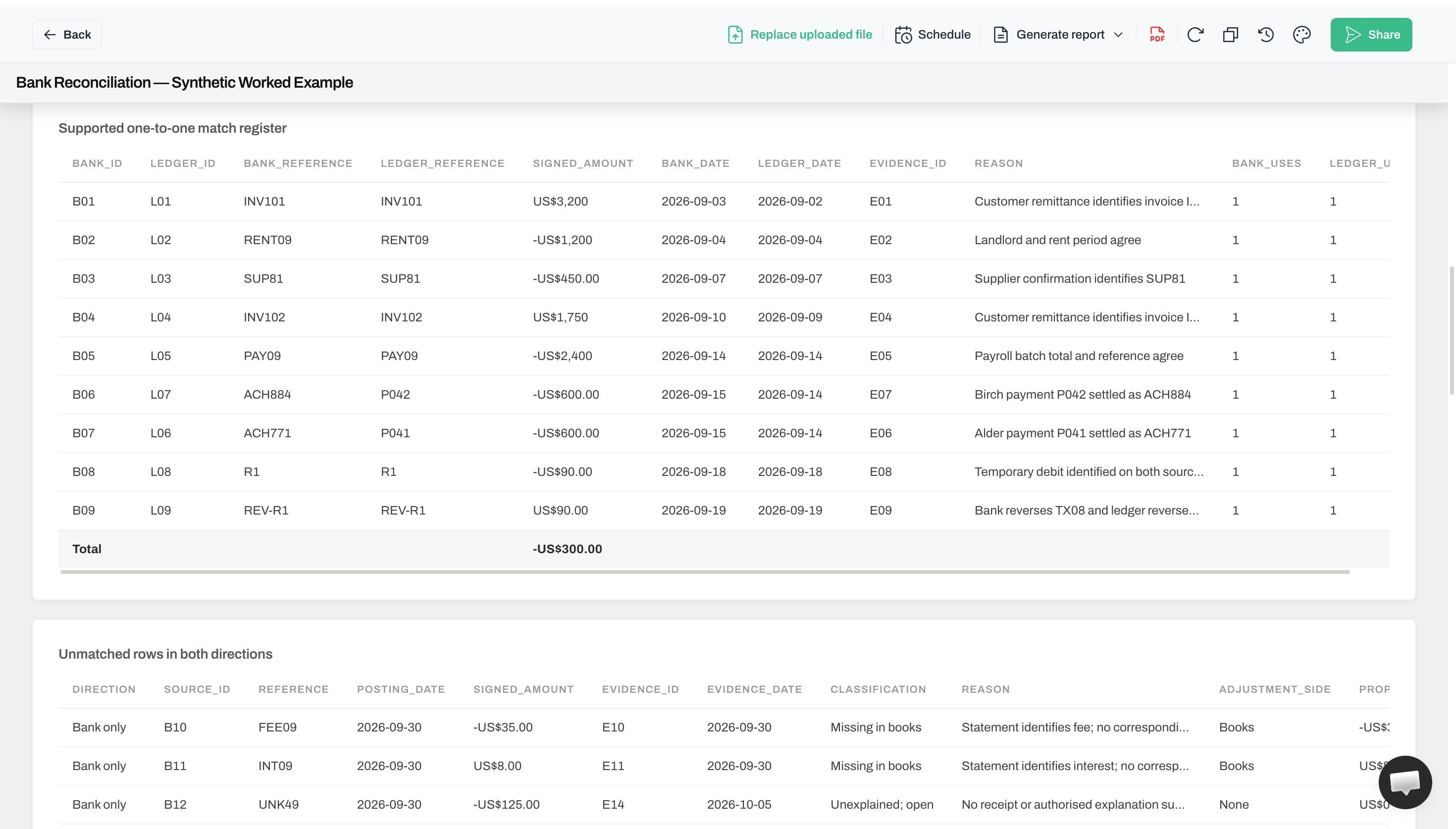
Inspect the references behind the supported pairs
The nine supported pairs retain both source IDs and references. Long reasons and the rightmost column are clipped; the export retains full fields. First-party Anomaly screenshot, 23 October 2026; synthetic practice data. Click to enlarge.
03. Find missing records in both directions
After confirming the supported pairs, compare the remaining records both ways: bank entries without a supported ledger match, and ledger entries without a supported bank match.
Check missing records in Excel in both directions
Copy accepted bank source IDs into A2:A13 and the confirmed match register’s bank IDs into B2:B10 on a checking sheet. In C2, enter =IF(A2="","",IF(COUNTIF($B$2:$B$10,A2)=0,"Unmatched","Matched")), fill down through A13, and filter C for Unmatched. It returns B10, B11 and B12. The same check with all 11 ledger IDs against the nine matched ledger IDs returns L10 and L11. Use matching ID types on each side.
To compare any two Excel lists directly, put them in columns A and B, extend both ranges to their last row, and run the membership test in each direction. The reverse formula for B2 is =IF(B2="","",IF(COUNTIF($A$2:$A$1000,B2)=0,"Missing from A","Present")). Fill down and filter for missing values. Import keys as text, resolve stray spaces and blanks, and confirm uniqueness separately: membership does not compare duplicate counts. The example uses alphanumeric IDs; COUNTIF ignores case and interprets * and ? as wildcards in other keys.
Also test the match-register IDs against their original sources. Every matched ID must exist in its source and occur exactly once in the one-to-one register; use =COUNTIF($B$2:$B$10,B2) to flag counts other than 1. That prevents a reused match from making a bank payment disappear from the exception list. See the missing-records guide for the broader list workflow.
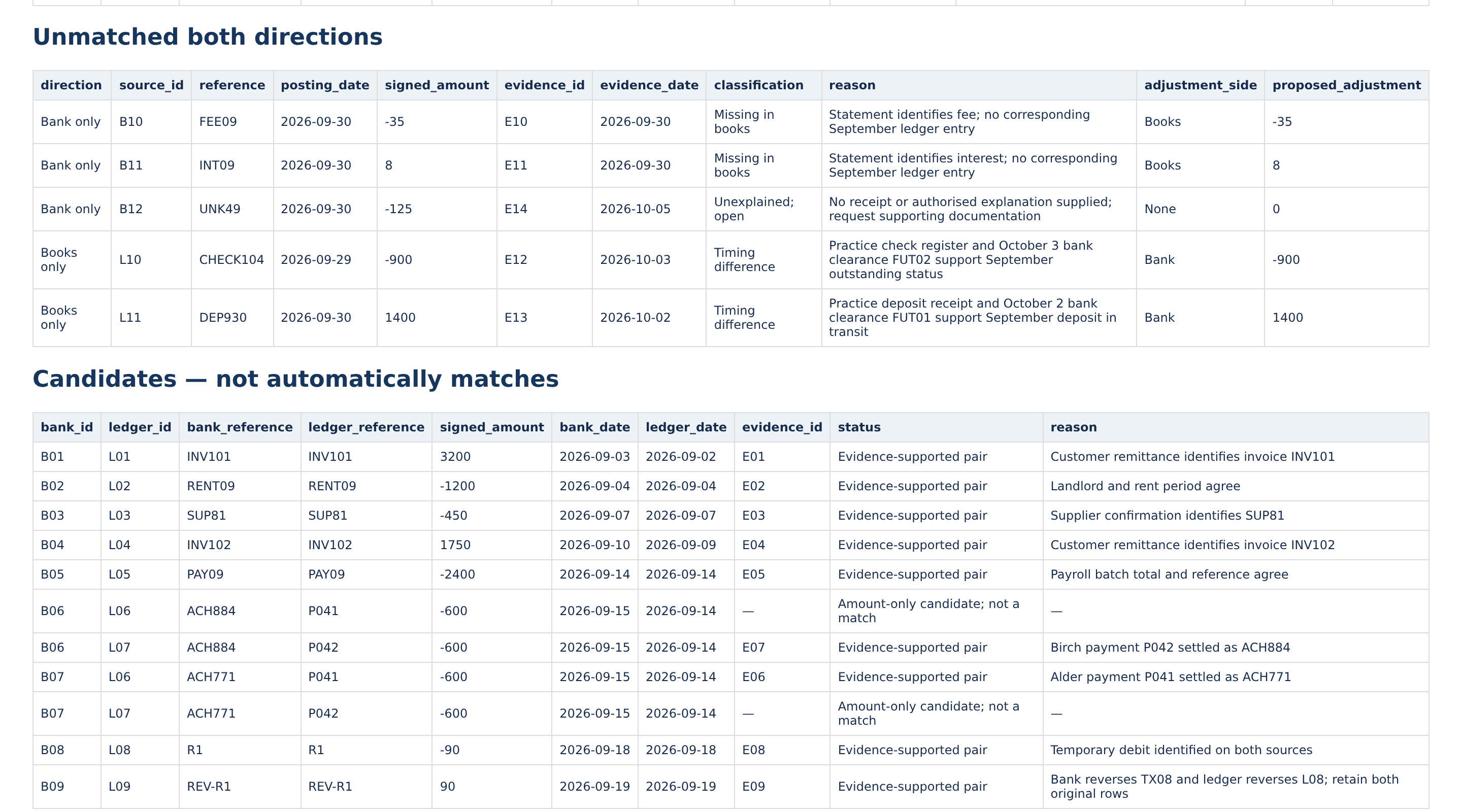
The example leaves these five rows:
Direction
Source ID
Signed amount
Explanation and next action
Bank entry without a ledger match
B10
−$35
The statement identifies a bank fee. Propose a book adjustment for approval.
Bank entry without a ledger match
B11
+$8
The statement identifies interest. Propose a book adjustment for approval.
Bank entry without a ledger match
B12
−$125
The card debit has no supplied explanation. Request documentation and leave it unresolved.
Ledger entry without a bank match
L10
−$900
A check issued in September clears on 3 October. Keep it as an outstanding payment at September’s cutoff.
Ledger entry without a bank match
L11
+$1,400
A deposit recorded in September clears on 2 October. Keep it as a deposit in transit at the cutoff.
A timing difference means a valid transaction appears in the two records in different periods. An outstanding payment is recorded in the books but has not cleared the bank. A deposit in transit is recorded in the books but has not yet appeared on the bank statement. CFI’s worked explanation describes these adjustments.
The October clearance notes support September’s outstanding status; do not add them to September’s bank movements. In a live reconciliation, retain the actual check register, deposit receipt and subsequent statement evidence.
Retain reversals: B08’s $90 debit and B09’s $90 reversal have corresponding ledger entries and explicit evidence. They net to zero, but deleting them loses the history. Opposite amounts alone do not establish a reversal.
In Anomaly: the unmatched register separates the three bank-only rows from the two book-only rows. B12 is “Unexplained; open,” with no adjustment proposed. A zero in that adjustment field means no entry is proposed; the bank cash effect is still −$125.
Inspect what remains open and what evidence is needed
Anomaly-generated HTML report export, unchanged: five unmatched rows retain their classifications and evidence IDs. B12 has no proposed adjustment. Synthetic practice data; locally rendered report, not the app interface. Click to enlarge.
How it was checked: nine accepted bank rows and nine ledger rows are matched. Three bank rows and two ledger rows remain; the excluded duplicate is tracked separately. Every original row has one recorded disposition, and all five Anomaly exceptions agree with the prepared register.
04. Calculate the adjustments and preserve the difference
Put each supported difference on the correct side. Timing items already recorded correctly in the books adjust the bank-side comparison. Bank fees or interest missing from the books adjust the book-side comparison. The distinction prevents you from subtracting an outstanding check twice.
Under this example’s sign convention, the formulas are:
Adjusted bank = bank closing balance + deposits in transit − outstanding payments ± supported bank-error corrections.
There are no supported bank-error or book-error corrections in this sample. Its two calculations are:
Bank: $9,548 + $1,400 − $900 = $10,048.
Books: $10,200 + $8 − $35 = $10,173.
Then calculate remaining difference = adjusted bank − adjusted books. Here, $10,048 − $10,173 = −$125. The negative sign means the bank side is lower.
B12’s $125 debit accounts numerically for the gap, but its business purpose and accounting treatment remain unknown. Obtain supporting evidence; do not insert a miscellaneous expense merely to make the difference zero.
The interest and fee remain proposals; the original ledger is unchanged. An authorised person must approve and record their treatment, then rerun the checks against updated records.
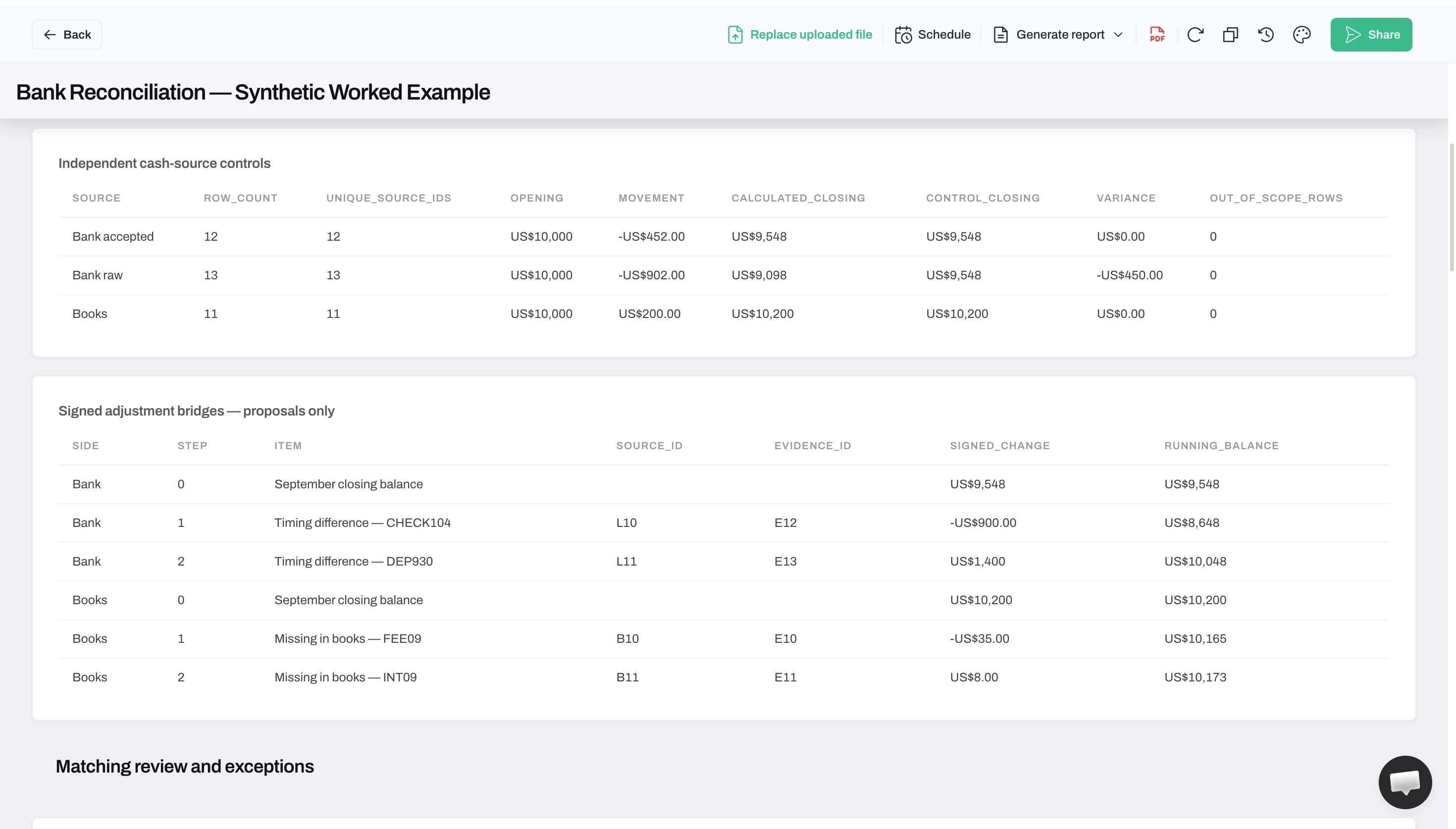
In Anomaly: the exported adjustment tables reproduce both adjusted balances and preserve −$125 in the summary. The external Decimal and integer-cent calculations agree with all four signed adjustments. The 11 mutation and withheld-evidence checks were offline tests, including altered controls, conflicting duplicates, unsupported pairs and duplicate adjustments. They were not additional product runs and provide no accounting assurance or fraud-detection evidence.
Follow each signed adjustment back to its source
The duplicate creates the raw −$450 control failure. Accepted source controls agree; four adjustments still leave −$125. First-party Anomaly screenshot, 23 October 2026; synthetic practice data. Click to enlarge.
05. Prepare the monthly review and carry items forward
Prepare the monthly bank reconciliation after the statement arrives. Retain the cutoff and evidence date, and have another person review the sources, decisions and open items. Use a more frequent cadence where cash exposure, volume or your controls require it. NetSuite’s process guide discusses frequency and review.
Give the reviewer the statement, both source checks, match register, five-item exception table and supporting documents. Record the preparer, reviewer, dates and approved actions. The practice report leaves review unperformed; it is not a signed reconciliation.
Carry September’s supported outstanding items into October with their original IDs and dates. When the $1,400 deposit and $900 check clear, connect the October bank entries to those carried items rather than creating another book receipt or payment. Retain their September history after clearing them.
Keep the $125 exception open with an owner, a documentation request and a review date. Do not silently relabel it as a timing item. Once resolved, record the evidence and approved action, check both balances again, and preserve the earlier report version. Next month’s opening controls must follow the actual records and approved entries, not an unposted adjusted balance copied from this report.
How it was checked: Anomaly exported a reviewer summary, matching register, candidates, source controls, adjustments and unresolved items. We compared the material IDs, classifications and amounts with the separately prepared results, using Python Decimal and Node integer cents. Both checks were written by the article owner. Agreement supports consistency with the supplied rules, not independent accounting approval or proof of every business assumption.
Download the actual Anomaly review export to inspect the full generated HTML report and CSV tables. It is separate from the practice package’s prepared expected results. Neither package records a ledger posting or completed accounting approval.
Before you hand over the report
Check these points against your own files:
The account, currency, reporting cutoff and preparation date are explicit.
Each source’s opening balance and movements agree with its closing control.
Duplicate export rows remain traceable, and supported matches use rows once.
Missing records were checked in both directions and classified with evidence.
Adjustments have signs, source references and approval status; the remaining difference stays visible.
The reviewer has the supporting documents and next-period carry-forward list.
Common questions
If the two adjusted balances agree, is the job finished?
Agreement is necessary, but it does not prove the matches are correct. The two swapped $600 pairs in this example would preserve the same totals. Check the supporting references, completeness and row usage before closing the report. Matching totals cannot supply missing evidence.
What if one bank payment covers several ledger entries?
Treat it as a separate matching case. List every contributing ledger ID, verify the combined signed amount and inspect the remittance or settlement breakdown. A total of $500 could combine $300 and $200, but arithmetic alone does not prove that connection. This exercise confirms one-to-one matches only; leave a split or partial payment unconfirmed until its allocation is supported.
Can I start with a PDF bank statement?
Yes, but extracting rows is preparation, not reconciliation. Check the extracted account, dates, opening and closing balances, transaction signs and totals against the original PDF. Then compare those records with the cash ledger. A readable spreadsheet of bank transactions does not establish that the books agree.
Your next comparison
Reproduce the four-stage workflow with the three input CSVs and recorded instructions above: validate the sources, match with evidence, calculate the adjusted balances, and inspect what remains unresolved. Download the resulting tables and compare them with the prepared practice results before adapting the process to your records.