

Data Analysis
12 min
How to Create an Excel Spreadsheet with AI
Build a sales workbook (an Excel file) with three sheets, editable formulas and numbers you can check. Follow the example from source records to the downloaded file.
Read More
Data Analysis — Guide · 2026
Check a business comparison from the source rows through averages, a t-test that compares two groups, and correlation and regression for two linked measures. Follow the synthetic example and reproduce the calculations.
 16 min read
How do you use AI for statistical analysis?
Give the AI a defined question and a checked dataset, ask it to execute a named statistical method, then inspect the calculations and interpretation. Start with counts and distributions (how the values are spread out) before testing differences or relationships. This guide follows one business example through descriptive statistics (summary numbers such as averages), Welch’s t-test (a comparison of two group averages), and correlation and regression (whether two measures move together, and by how much), with downloadable files and independent checks.
You run a support team. A pilot workflow’s average handling time looks lower than the current workflow’s. Before recommending a change, you need to know which operators were counted, how large the difference is and what else might explain it.
AI can help turn that question into calculations and charts. The useful output is an analysis you can explain at the next meeting: what changed, how uncertain it is, and what remains unproven.
We use a synthetic support-operations file for the week ending 27 September 2026. Each row records one operator’s workflow, tenure, ticket count and average handling time. It includes deliberate duplicate records and missing values. The numbers were constructed for teaching; they are not customer results or evidence that a workflow improves performance.
Download the raw CSV or equivalent Excel workbook. The sample and calculation-check pack includes the cleaned workbook, an outlier variant (the same file with one extreme value), readable results and reproducible R and Python scripts. Running code is optional.
On 19 October 2026, separate calculations in R 4.3.3 and in SciPy 1.15.3, a Python scientific library, reproduced the numerical results below from the raw CSV. Each cleaned its own input. Getting the same results in both checks the arithmetic; it cannot establish that a real study has suitable sampling or a valid design.
We also ran the CSV through Anomaly AI in a development test account that day. Its row audit, descriptive statistics, Welch test, correlation and regression agreed with these reference calculations at the precision shown. Saving some of the results needed automatic retries. The tester could see the reference results; the prompts did not give Anomaly those answers. The screenshots below show that run. This small-file test does not establish limits for larger files or what a free plan includes.
State the outcome, units, groups and observation period. Decide whether rows represent independent observations (different people, each measured once), repeated measurements or individual transactions. Choose the comparison and the smallest difference that would matter before inspecting the result.
Here, the outcome is an operator’s average handling time in minutes. Each operator receives equal weight, whether they handled 40 tickets or 50. Pooling all tickets would answer a different question and give busier operators more influence.
For real data, decide which wider workforce or period the sample should represent. A file containing every operator that week describes that week. A statistical test does not automatically justify extending its findings to other teams or future weeks. The table below matches each method in this guide to the question it answers.
| Question | Method | Output to inspect |
|---|---|---|
| What do the groups look like? | Descriptive statistics | Count, mean (average), median (middle value), sample standard deviation (spread) and distribution |
| How different are two independent group means? | Welch’s t-test | Difference, confidence interval (the range showing its uncertainty) and test settings |
| Do two numeric measures move together? | Pearson correlation | Scatterplot, number of complete pairs and the correlation r, from −1 to +1 |
| How does the relationship look in business units? | Simple linear regression | Slope (change per unit of input), intercept (the line’s value at zero), R² (share of variation explained) and residuals (each value’s gap from the line) |
For the comparison, define the difference as pilot minus current. Use a two-sided test, which counts a difference in either direction, and a 95% confidence interval. Use 0.05 as the illustrative significance threshold, the cut-off for the p-value explained in step 4. Suppose one minute is the smallest difference worth investigating operationally; that is a hypothetical business threshold, not a statistical rule.
The groups are observational (operators were not assigned to them as an experiment) and contain different operators. Their difference does not establish a workflow’s causal effect. Ticket difficulty, experience and staffing could also differ. This example’s artificial data show how the calculations work if the methods’ assumptions hold.
Inspect the imported columns. Remove exact repeated records, keep missing outcomes separate from zero and save the inclusion rule. Check the remaining row count and group sizes before running a test.
Upload the raw CSV or workbook to your Anomaly project. When the import finishes, open the imported table and inspect workflow, tenure_months and avg_handle_minutes. Confirm that handling time is numeric minutes. A blank cell means the value is missing, not that the operator completed work in zero minutes.
Open the imported table before asking for statistics
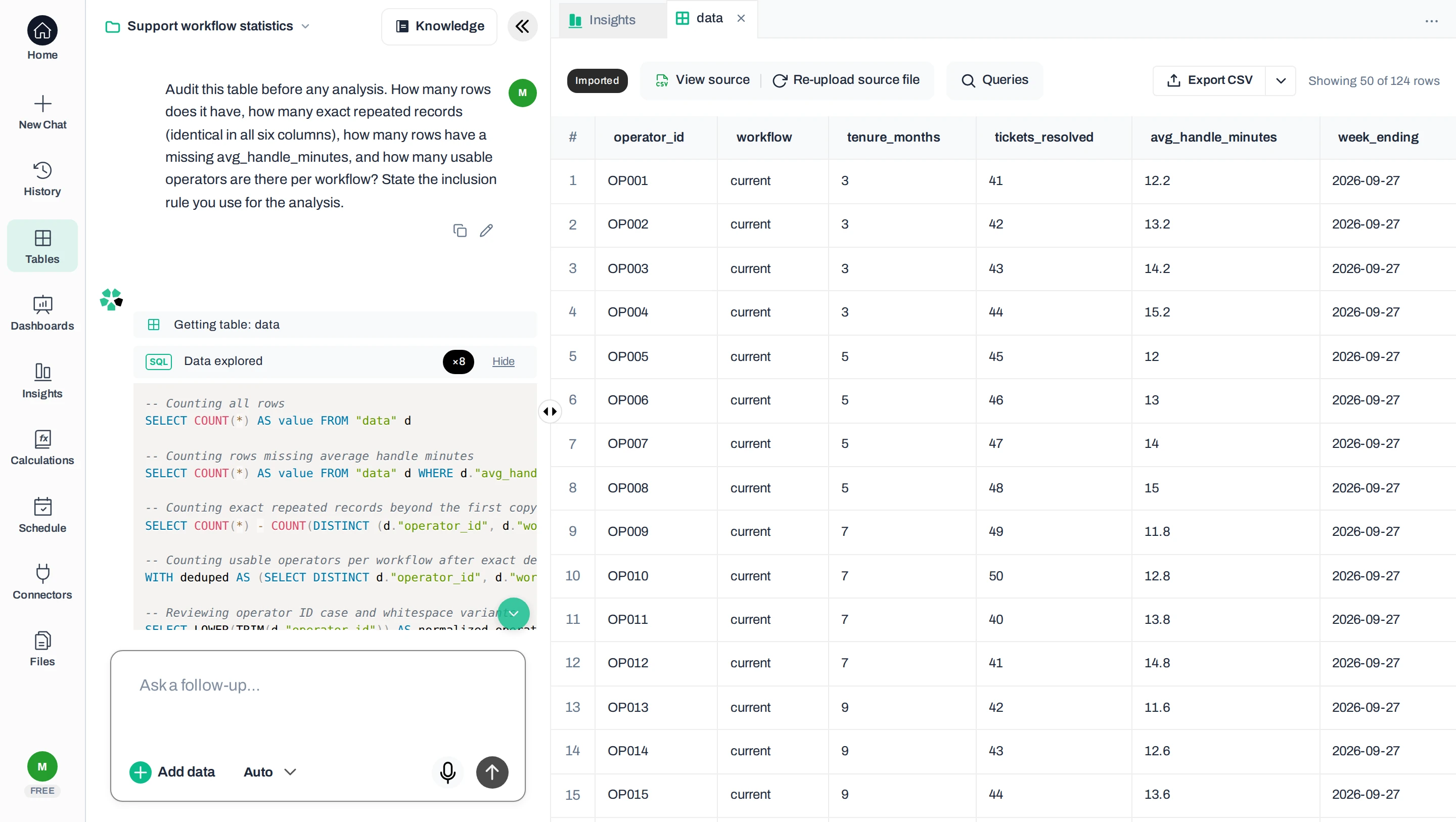
Then ask Anomaly to audit the rows with this prompt:
Audit this table before any analysis. How many rows does it have, how many exact repeated records (identical in all six columns), how many rows have a missing avg_handle_minutes, and how many usable operators are there per workflow? State the inclusion rule you use for the analysis.
The table below shows the row counts at each stage of the audit.
| Stage | Rows | Reason |
|---|---|---|
| Raw file | 124 | Includes the deliberately repeated and incomplete records |
| After exact duplicate removal | 122 | Two repeated copies removed |
| With a recorded handling time | 120 | One missing outcome excluded from each workflow |
| Groups used | 48 current-workflow and 72 pilot operators | One complete observation per operator |
Check which rows count
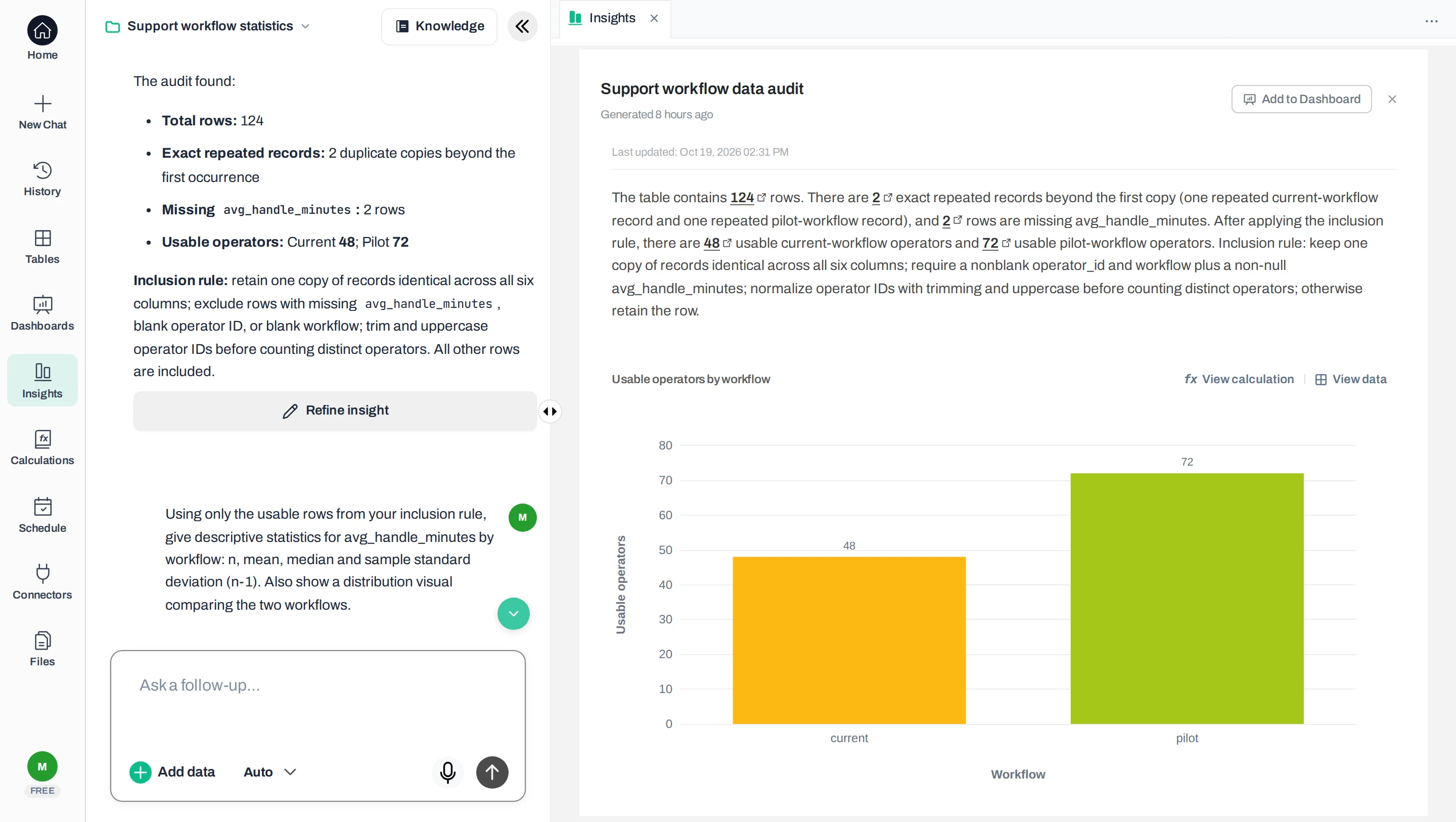
Two people with the same handling time are still two observations. Conversely, the same person measured next month is a repeated observation, even when every cell differs. Removing duplicates cannot solve dependence between measurements, such as repeated measurements of the same person.
Keep these rules with the result so a colleague can reproduce the selection. For a larger cleanup job, use the CSV analysis workflow. When repeated records disagree, the guide to removing duplicates by key explains the separate decision about which record to retain.
Calculate the count, mean, median and sample standard deviation for each group. Keep the number of missing values visible. Inspect the distribution for unusual values, and independently reproduce the summary statistics.
| Measure | Current | Pilot |
|---|---|---|
| Operators included | 48 | 72 |
| Missing outcomes excluded | 1 | 1 |
| Mean handling time | 12.60 min | 10.60 min |
| Median handling time | 12.60 min | 10.60 min |
| Sample standard deviation | 1.328 min | 2.284 min |
The mean is the arithmetic average. The median is the middle of the sorted values. Standard deviation describes spread around the mean; a larger value means more variation. The pilot has a lower average and greater spread in this file. Neither fact tells us whether it caused a change.
Ask for a box plot (a chart of each group’s middle, spread and extreme values) or a plot of individual values with workflow and handling time in minutes labeled. Show both groups on the same numeric scale. A mean-only bar chart hides the spread and unusual observations you need to examine. For research data, retain the sample size and units in every graph.
Inspect the distributions
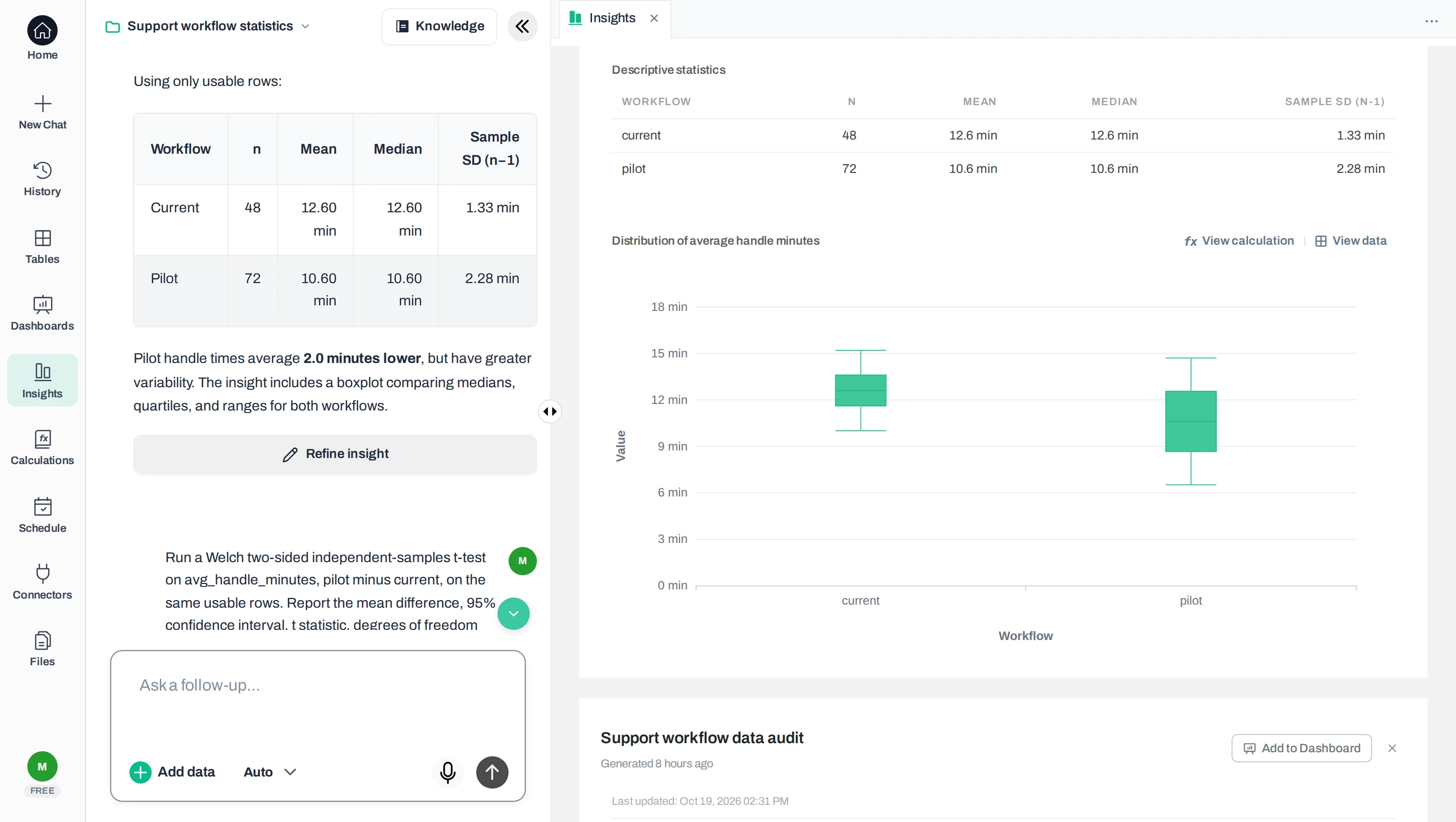
Open the cleaned check workbook. On its Current sheet, the 48 handling times occupy E2:E49. In empty cells, enter =COUNT(E2:E49), =AVERAGE(E2:E49), =MEDIAN(E2:E49) and =STDEV.S(E2:E49). On Pilot, use E2:E73.
Excel’s STDEV.S uses the sample formula, which divides by n−1, where n is the number of included values. In Google Sheets, STDEV gives that sample standard deviation. These formulas check the selected numbers; they cannot tell whether you selected the right people. See the Excel analysis guide or Google Sheets analysis guide for the surrounding spreadsheet workflow.
For two independent groups with a numeric outcome, request a two-sided Welch t-test. Report the direction of subtraction, mean difference, 95% confidence interval, t statistic, degrees of freedom and p-value together; each is explained after the results.
Welch’s test allows the groups to have different spreads and sample sizes. It still needs independent observations and a sound basis for modelling how much the result would vary from sample to sample. A two-sided test considers differences in either direction. A strongly lopsided spread of values (skew) or single values that sway the result (influential values) deserve investigation. A paired test suits a different design, such as the same operators measured before and after a change.
Then ask for the test with this prompt:
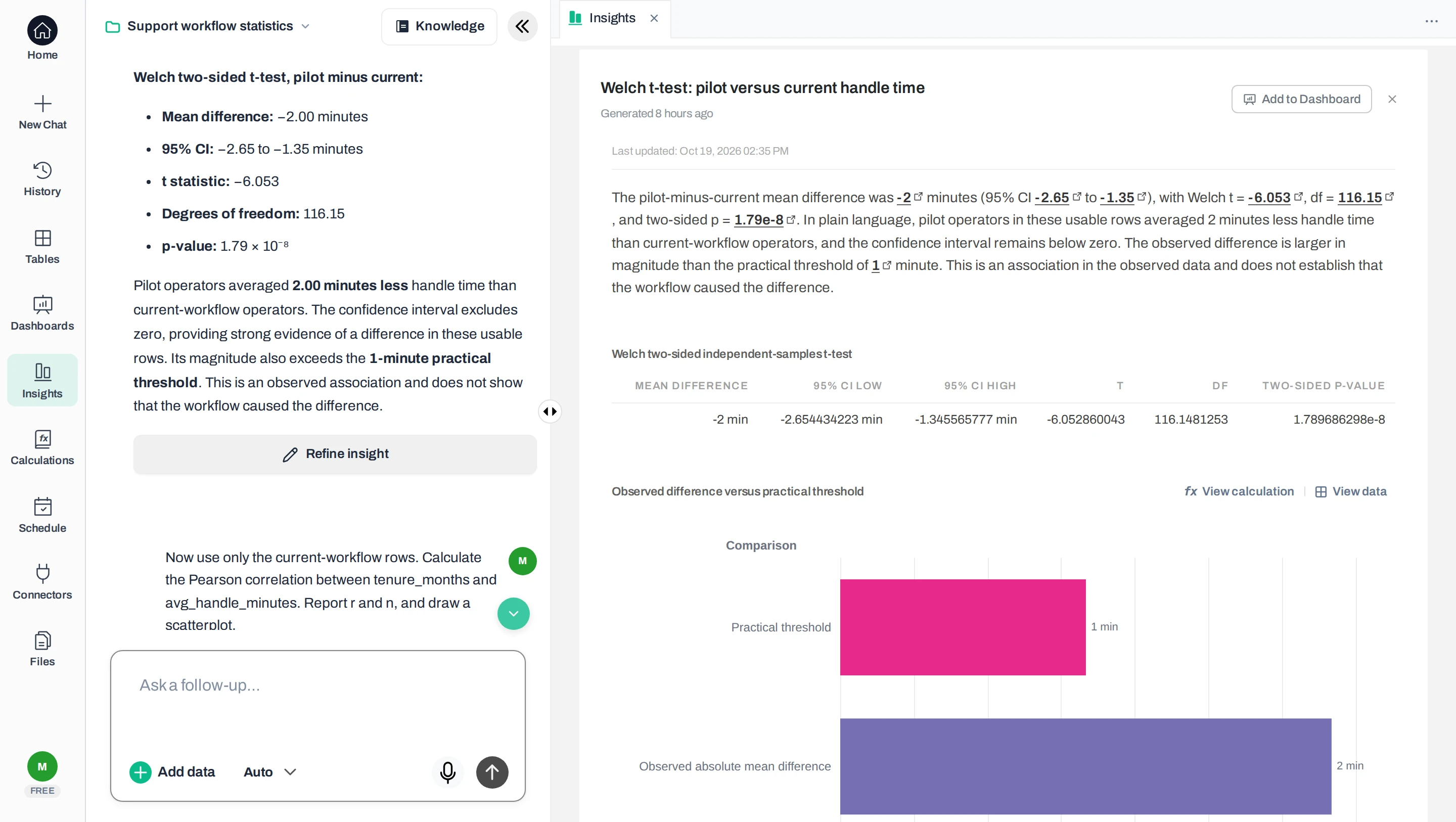
Run a Welch two-sided independent-samples t-test on avg_handle_minutes, pilot minus current, on the same usable rows. Report the mean difference, 95% confidence interval, t statistic, degrees of freedom and p-value. Explain the result in plain language, including whether the difference is larger than a practical threshold of 1 minute, and make no causal claim.
The independent reference calculations give these results:
| Result | Value |
|---|---|
| Mean difference: pilot − current | −2.00 minutes |
| 95% confidence interval | −2.654 to −1.346 minutes |
| t statistic | −6.053 |
| Degrees of freedom | 116.148 |
| Two-sided p-value | 1.79 × 10⁻⁸ |
The negative difference means the pilot group’s average is lower. The interval runs from about 1.35 to 2.65 minutes lower, entirely beyond our hypothetical one-minute threshold. If the test’s assumptions hold, this is evidence of a difference that would merit investigation; it is not a rollout decision.
The t statistic expresses the estimated difference relative to its standard error, a measure of uncertainty in that estimate. Welch’s degrees of freedom adjust the uncertainty calculation for the groups’ sizes and spreads, so the value need not be a whole number. The R t-test documentation identifies these outputs and the setting that allows unequal spreads (variances).
The actual Anomaly test output, converted to CSV, preserves the unrounded values. We compared that downloaded result with the separate reference calculations, rather than relying only on the chat explanation.
Keep the test settings visible
The p-value describes how unusual a result at least this extreme would be if the true group means were equal (the null hypothesis) and the test’s assumptions held. It is not the probability that the null hypothesis is true, that the pilot works, or that the finding happened “by chance.” A large p-value would not prove the workflows equivalent.
Under its assumptions, the method behind a 95% confidence interval captures the population difference (the true difference in the wider group the sample represents) in about 95% of repeated samples. It does not give a 95% probability that this fixed population difference lies inside this particular interval. Read uncertainty alongside effect size (how large the difference is) and study design; the American Statistical Association’s guidance warns against basing decisions on a significance threshold alone.
Choose one clearly defined subset and pair the two numeric measurements on the same rows. Plot them, then calculate Pearson correlation if a straight-line relationship is the question. Keep association separate from causation.
Now ask whether more experienced operators tend to have lower handling times within the current workflow. Use its 48 complete pairs: tenure in months on the horizontal axis and handling time in minutes on the vertical axis. Mixing workflows would introduce another difference into the relationship.
The checked Pearson correlation is r = −0.525. Higher tenure tends to accompany lower handling time, with substantial variation around that relationship. Pearson’s r ranges from −1 to +1 and measures straight-line association; the SciPy reference also illustrates why a small correlation can conceal a curved relationship.
Inspect the scatterplot before summarizing it. Unusual points can change r, and a pattern does not show that extra tenure causes faster work. A rank correlation, such as Spearman’s, asks whether the values rise or fall together in order, not necessarily along a straight line; it is not an automatic repair for every problem with the data or design.
Inspect the paired observations
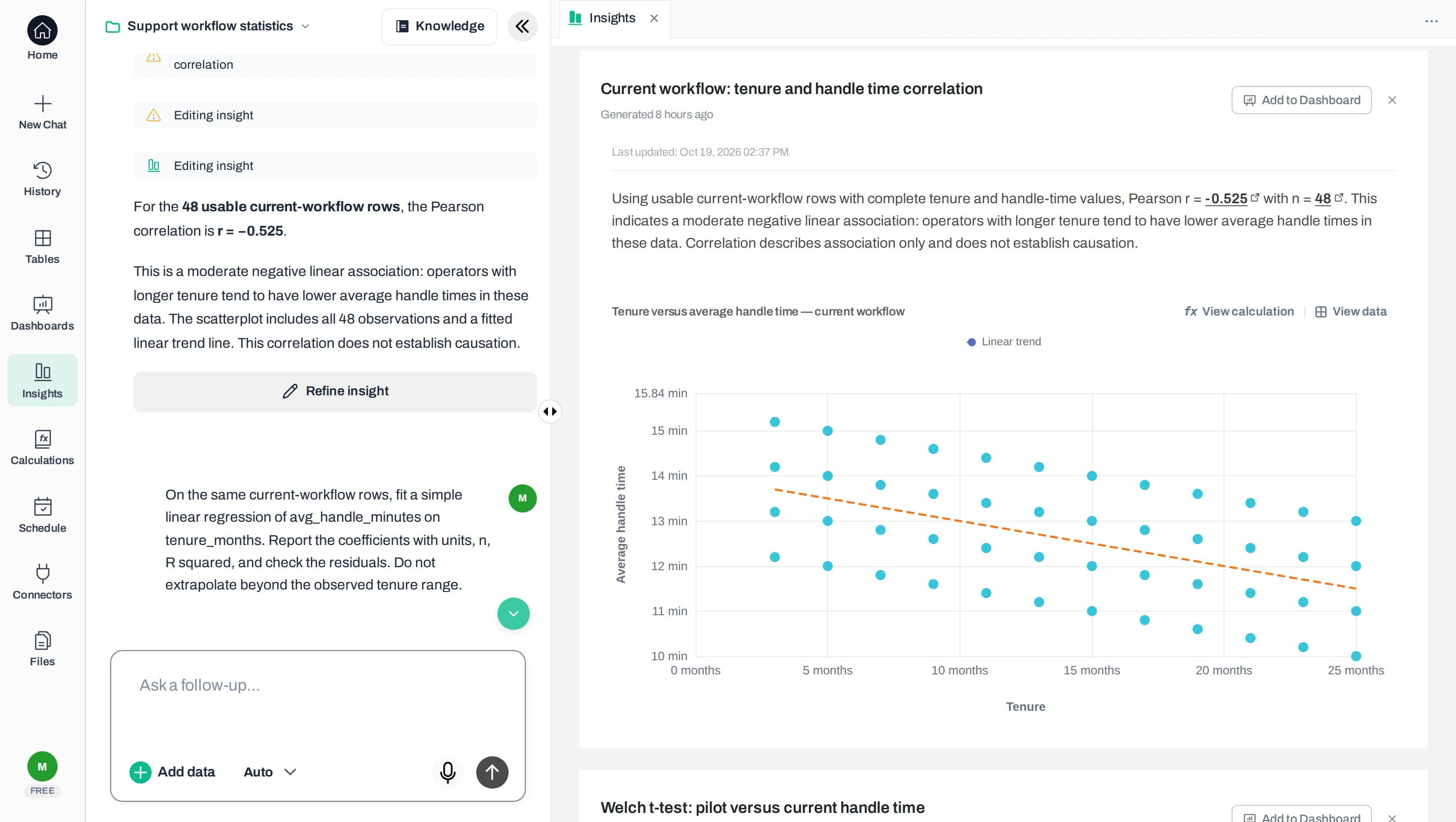
Fit a simple linear regression on the same complete pairs. Report the equation, units, sample size and R-squared. Inspect residuals and influential observations before interpreting the slope, and stay within the observed input range.
Correlation describes direction and strength. Regression expresses the fitted relationship in units you can discuss. Ordinary least squares chooses the line that minimizes the squared gaps between recorded and fitted values. For the same 48 current-workflow operators, fitting this line with an intercept gives:
Fitted handling time = 14 − 0.10 × tenure in months
Within this constructed sample, one additional month of tenure corresponds to 0.10 minutes lower fitted handling time, or six seconds. The slope is descriptive, not a claim that another month of employment will produce that improvement.
Read the fitted line in business units
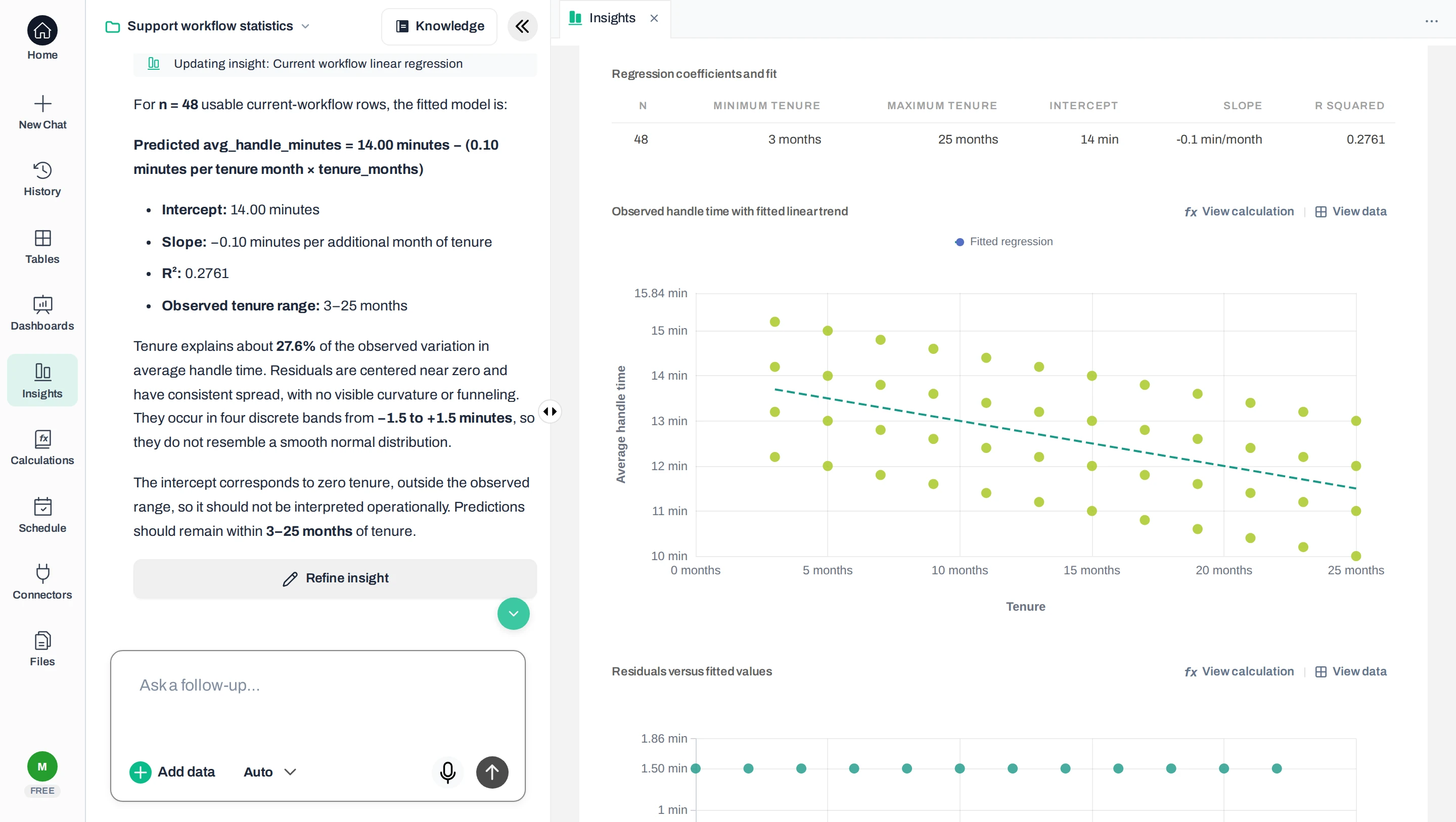
R² = 0.276: the fitted straight line accounts for about 27.6% of the variation in these handling times around their mean. It does not mean “27.6% accurate.” Here, R² equals Pearson r squared, as documented for simple linear regression in SciPy.
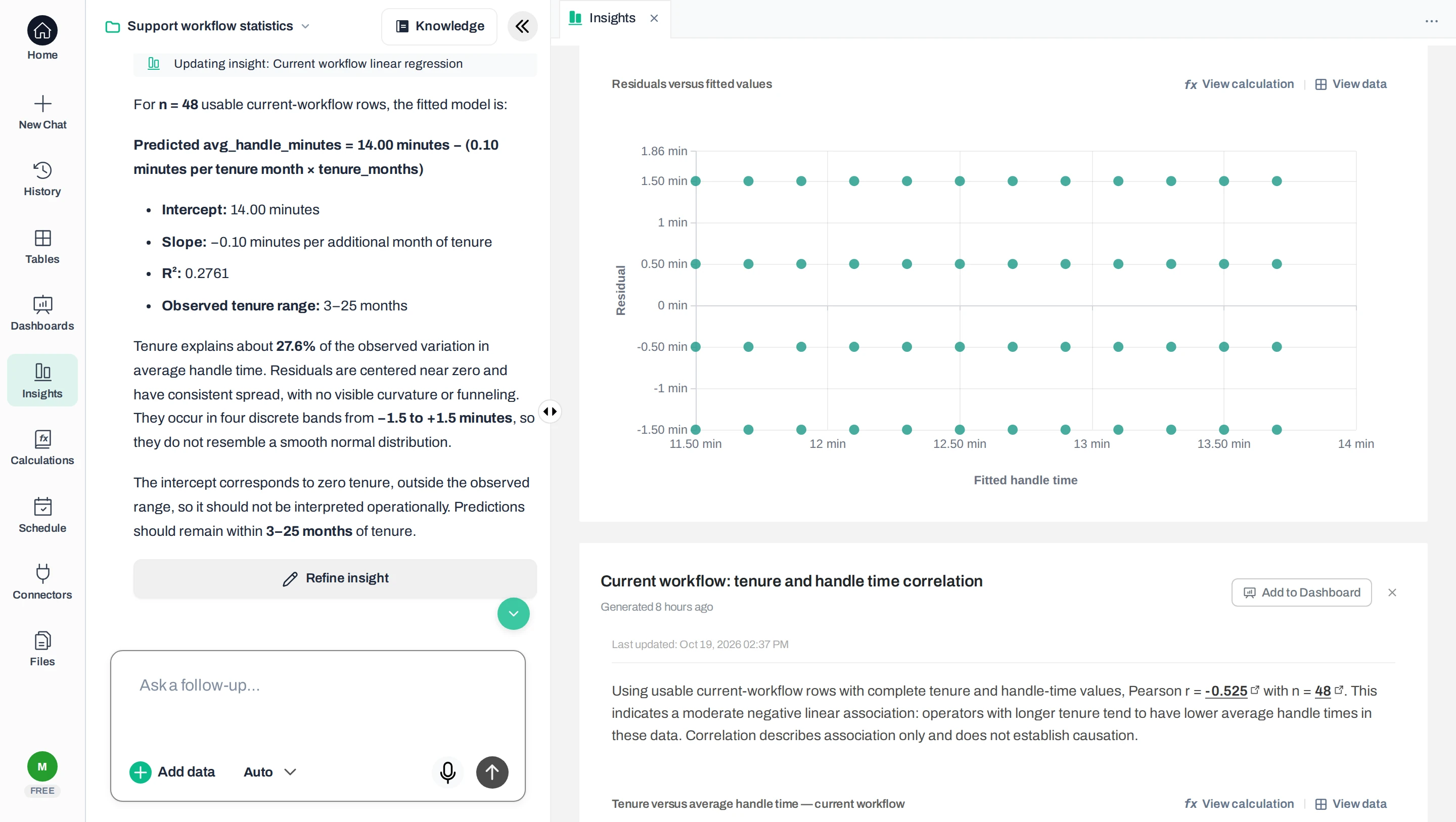
A residual is the observed value minus the fitted value. Plot residuals against fitted values: look for curvature, widening spread and individual points that dominate the result. The US National Institute of Standards and Technology (NIST) explains in its model-validation guidance why a high R² cannot replace those checks. The residual table in the calculation-check pack preserves every point used here.
Here, residuals form four bands from −1.5 to +1.5 minutes with consistent spread. That artificial pattern does not resemble a smooth, bell-shaped normal distribution.
Inspect the residuals
Observed tenure runs from 3 to 25 months. The intercept of 14 is the line’s value at zero months, outside that range; do not interpret it as measured performance for a new starter. This explanatory fit has not been validated for forecasting or staff assessment.
In the outlier variant, one current-workflow operator has a 50-minute average. That operator’s record appears twice and both copies contain the change, so the same duplicate rule still leaves 48 current and 72 pilot observations. Repeating the independent calculations gives:
| Measure | Original file | 50-minute variant |
|---|---|---|
| Current mean | 12.60 min | 13.39 min |
| Current median | 12.60 min | 12.70 min |
| Pilot − current difference | −2.00 min | −2.79 min |
| 95% Welch interval | −2.65 to −1.35 min | −4.48 to −1.09 min |
| Current-group Pearson r | −0.525 | −0.354 |
See the extreme value before reading r
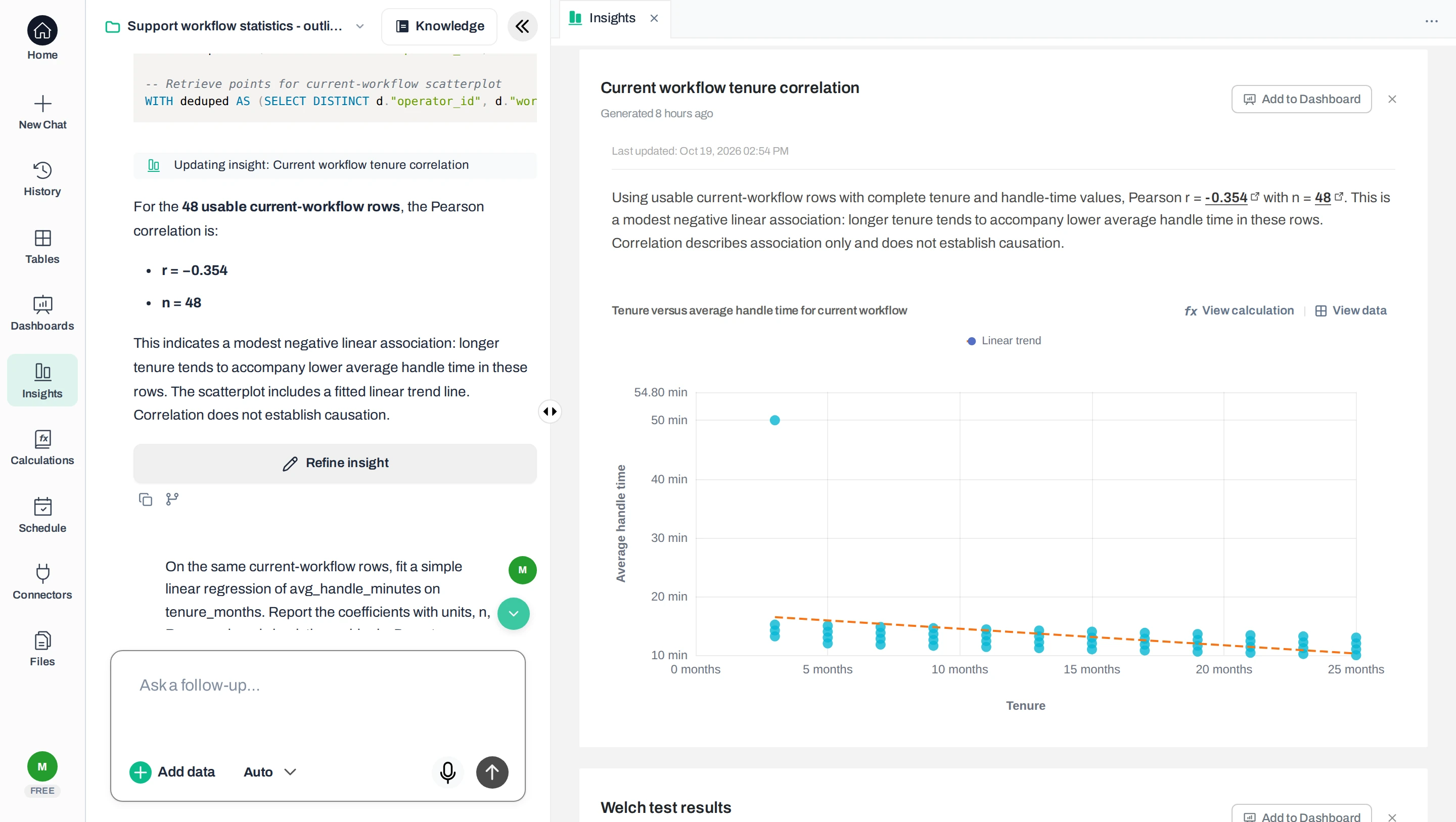
The mean difference grows, but its uncertainty also grows. The median barely moves, and the correlation weakens. First investigate whether the extreme value is a recording error, a valid difficult week or evidence that the average hides different kinds of work. Keep a valid value unless you have a defensible exclusion rule. Instead of silently deleting it, show a sensitivity analysis: results with and without the value, as in the table above.
The best AI tool for statistical analysis depends on the methods and evidence your job needs. For a spreadsheet-based business review, prioritize a tool that runs the method on the complete file, shows clearly which rows were used and gives output you can inspect. For academic work, add the study’s required methods, reproducibility standards and review process.
| Approach | Useful when | Check before choosing |
|---|---|---|
| Anomaly AI, tested here | You want to ask questions about a business file and inspect calculations without writing code. | Test your method and dataset. Our small test in a development account does not establish every method, file limit or what each plan includes. |
| AI-assisted R or Python workflow | You need programming flexibility, particular packages or custom visualizations. | Check that you can run and review the code, lock the exact package versions and reproduce the result. Generated code still needs checking. |
| Dedicated statistical software, such as jamovi | You want explicit method controls or established research procedures. | Check that the required method and diagnostics (checks such as residual plots) exist. Confirm licensing, import/export formats and team skills. |
Evaluate accuracy with a known-answer file like this one. Evaluate usability by completing the whole task: import, method choice, diagnostics and saved report. Compare the price of that complete workflow, including file limits, execution quotas and exports. A free upload or polished explanation does not establish that the analysis can be finished.
Repeated observations, operators grouped under the same managers, complex surveys or many simultaneous comparisons need additional design choices. For example, searching dozens of outcomes and reporting only the smallest p-value changes how convincing that result is. Get statistical review when the design is more complex than this simple comparison or the decision has bigger consequences.
For broader product choices, see our AI data analysis tools comparison and guide to data analysis software. Their general workflow checks do not replace testing the statistical method you intend to use.
Keep the source file, inclusion rule, method settings, calculations and interpretation together. State what the evidence does and does not establish. Reconsider the study design when the next report includes repeated observations.
A useful decision note for the original sample reads:
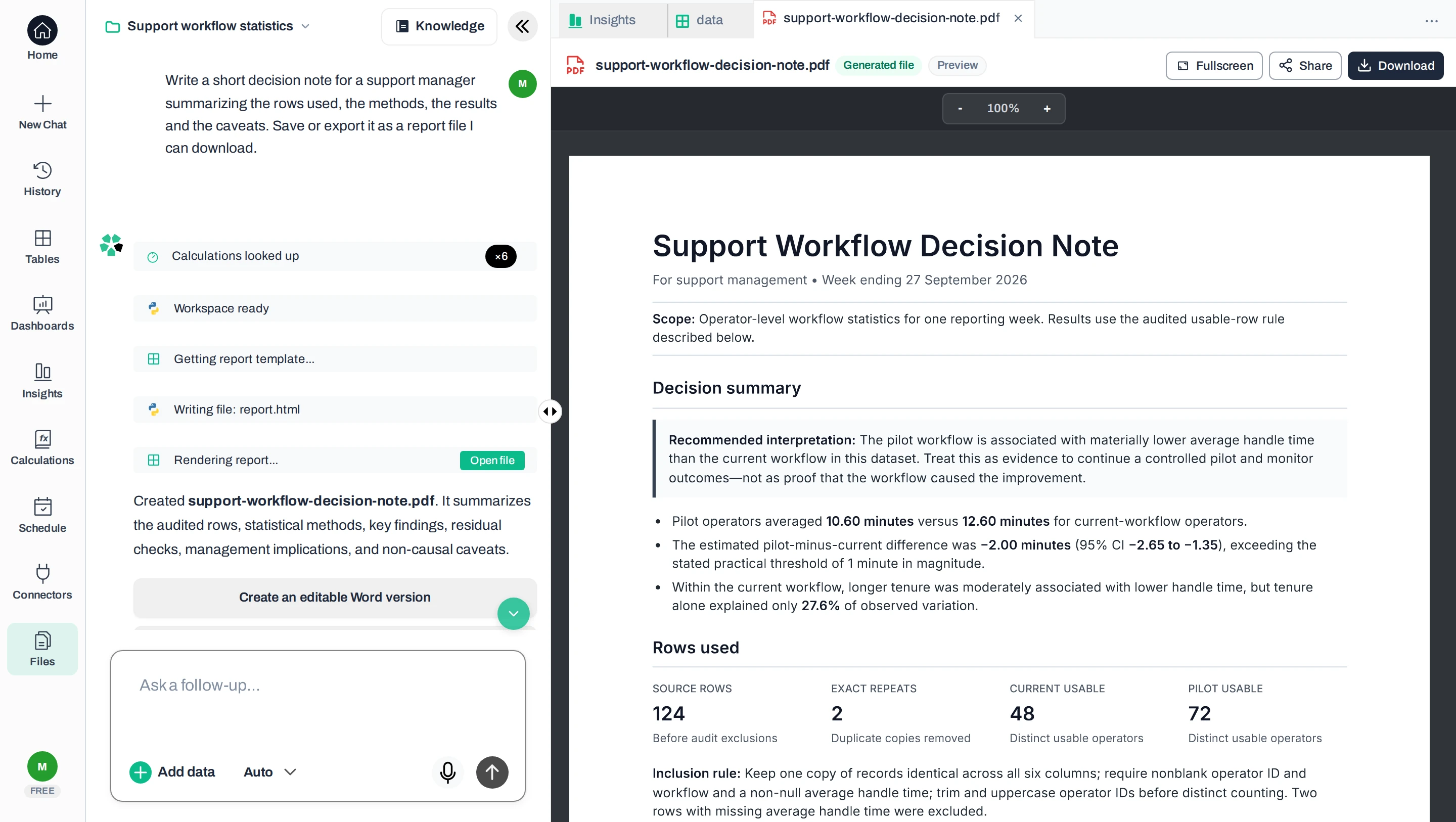
After removing two exact repeats and excluding two missing outcomes, we compared 72 pilot operators with 48 current-workflow operators, equally weighted. Pilot minus current mean handling time was −2.00 minutes; the two-sided Welch 95% interval was −2.65 to −1.35. This synthetic observational example does not establish a workflow effect. For real data, investigate ticket mix and service quality before considering a controlled evaluation.
We asked Anomaly to save a decision note and downloaded this unedited report from the synthetic example. Its figures are correct, and so are its caveats that the data do not show cause. But it recommends continuing the pilot and does not label the data synthetic. Constructed teaching data cannot justify that business action. Review the recommendation as carefully as the arithmetic.
Review the saved report
For next month’s report, reuse the definitions but reconsider the design. A new within-month comparison of different operators can still use an independent-groups test. Comparing the same operators across months instead requires attention to their related measurements: paired differences for a before/after question, or a model accounting for repeated observations across several periods. Anomaly made this distinction when we asked about measuring the same operators again.
A free AI plan is useful only if its current file, calculation and usage limits cover your task. Check those limits before uploading. You can run this guide’s independent reference calculations with R or SciPy, or use the free jamovi desktop app without code. Those are statistical tools, not AI assistants.
Choose an application that can execute your required method on the complete file, show which rows it used and preserve a checkable result. The name of the AI model alone cannot establish those capabilities. Test a known-answer file first; prefer a code workflow when you need explicit package versions or methods unavailable in a business application.
An AI application with calculation tools can run tests; a text response alone does not prove execution. Look for the actual computation, input rows and saved numerical output. If the application only proposes code, you still need to execute and inspect that code before treating its suggested numbers as results.
Yes, conventional tools such as jamovi can calculate correlations between numeric columns from a CSV. Align both metrics to the same product and period first, and inspect a scatterplot. Product names or baskets of purchased items need a different analysis; assigning numbers to category labels does not make Pearson correlation meaningful.
jamovi documents its free desktop app and CSV support and its correlation methods; we did not run a comparative jamovi test for this guide. Check an AI provider’s current limits before relying on a free plan for the whole workflow.
Start with the sample and compare the results with the download pack. Then use your business data once you have agreed the question, what one row means and which rows count. Keep the output you can reproduce and the interpretation you can defend together.
Technical Product Manager, Data & Engineering
Ash Rai is a Technical Product Manager with 5+ years of experience building AI and data engineering products, cloud and B2B SaaS products at early- and growth-stage startups. She studied Computer Science at IIT Delhi and Computer Science at the Max Planck Institute for Informatics, and has led data, platform and AI initiatives across fintech and developer tooling.
LinkedInContinue exploring AI data analysis with these related insights and guides.
Build a sales workbook (an Excel file) with three sheets, editable formulas and numbers you can check. Follow the example from source records to the downloaded file.
Compare two versions of a spreadsheet and see what changed — View Side by Side, conditional formatting, the Spreadsheet Compare add-in, and a keyed way to show added, removed, and changed rows even when the rows move.

Combine many same-structure CSV exports into one file — headers matched once, types kept, a source column, and a count that reconciles.