

Tools & Comparisons
19 min
Most Accurate AI Data Analyst Tools in 2026: We Tested 10
We gave ten AI tools, including ChatGPT, Claude and Julius AI, the same sales data and checked every answer for accuracy.
Read More
Tools & Comparisons — Comparison · 2026
Choose an AI app for a spreadsheet analysis you can check, reproduce and hand over. Compare the calculations and the file you actually receive.
 18 min read
You have six months of sales and returns in an Excel workbook. Your manager needs a chart and a category summary. Three assistants can give you a confident explanation; the useful choice is the one that produces numbers you can check against the source and a report someone else can open.
ChatGPT is the name of an app. Claude and Gemini are the names of both an app and a family of models. What you get also depends on the mode you select, your subscription, the file tools and your instructions. So this test compares three app setups, not the large language models (LLMs) underneath them.
If another assistant helped write your analysis plan, you can reuse that brief. Keep the file, definitions and requested output the same when you seek a second opinion. Then compare the calculations and the report you can actually hand over.
| Browser app | Plan | Model and setting we selected | US monthly price on the web |
|---|---|---|---|
| ChatGPT | Pro (we could not confirm which Pro tier) | GPT-6 at Pro effort, the highest setting available | Pro costs $100, $200 or $500 a month, depending on the tier; the app does not show which tier this account pays for. |
| Claude | Max 20x (20 times the Pro plan’s usage) | Fable 5.1 at Max effort, with the Manual permission mode | $200 a month for Max 20x. |
| Gemini | Free (no Google AI subscription) | Auto model selection with High thinking; the app did not let us choose a named model | $0. Google's paid plans cost $4.99 (AI Plus), $19.99 (AI Pro) and from $99.99 (AI Ultra) a month. |
The three plans are not equal. Gemini ran on Google's free plan, while ChatGPT and Claude ran on paid plans costing $100 or more a month, so Gemini's results show what its free plan did, not what Google's paid plans can do. Prices are the published US web prices, checked on 19 and 20 October 2026, not our bills; currency, taxes and mobile prices can differ.
Our fictional workbook has five related sheets: Sales, Returns, Products, Categories and Regions. It includes ordinary reporting problems: repeated sales rows, returns linked to those rows, a category with no sales and an incomplete calendar year.
The workbook comes with a data dictionary, a short document that says exactly what to count. Repeated copies of the same sales line count once. Quantities are units, not revenue: there is no selling-price field. Category return rate means returned units divided by sold units. A category with no sales has an undefined rate. July through December are absent, not six months of zero sales.
The saved workbook contains 12,120 sales rows, of which 120 are exact repeats; 600 return events; 24 products; five categories; and four regions. We worked out every correct answer in advance from the saved files with SQL; these are our reference answers. We then checked them with a separate JavaScript calculation. Every workbook cell also matches its equivalent CSV file.
Download the same Excel workbook and read its data dictionary. The sample and checks package includes the four prompts, CSV tables, reference values and scripts to reproduce them. Give the app the workbook and dictionary; keep the reference answers for checking its output afterward.
Each app ran the workflow three times, each time in a fresh ordinary chat with the same four messages: describe the five sheets, build monthly, category and region sales totals, calculate return rates by category, then deliver a chart, a CSV, an Excel summary and three findings. The browser we used lost its connection three times, once while ChatGPT's first answer was being written, so that answer's timing is unknown; ChatGPT also needed a new login. No prompt was resent. Each message went out once. Our rules allowed one recovery message per run if an answer stalled, and we never needed it.
The prompts and reference answers were fixed before testing. The people running the tests had seen the reference answers, but sent only the fixed prompts and the workbook, with no hints about the numbers. A separate checker recalculated every result we scored. We make Anomaly, and these tests were not blind. A new chat did not remove the account's saved memory or custom instructions. We saved each returned file through the app's own file view or download link and recorded its fingerprint (a hash), so we can show it was not changed; we did not use the browser's own Download button.
We keep three problems apart: an app we could not use, a wrong calculation and a missing file. A usage limit does not prove an app calculates badly, and a correct answer still needs the requested file.
Each run had 22 pass-or-fail checks on the numbers, the code and the delivered file. The table shows how many each run passed.
| App and plan | Run 1 | Run 2 | Run 3 | All three runs |
|---|---|---|---|---|
| Claude (Max) | 22 of 22 | 21 of 22 | 22 of 22 | 65 of 66 |
| ChatGPT (Pro) | 21 of 22 | 21 of 22 | 22 of 22 | 64 of 66 |
| Gemini (Free) | 13 of 22, 1 not checked | 16 of 22, 1 not checked | 20 of 22, 1 not checked | 49 of 66, 3 not checked |
These are the problems behind the failed checks, run by run:
One check per Gemini run was not scored: whether the workbook's formulas update when you edit it. Gemini never said its workbook used formulas, so we left that check out. A correct answer later in a run did not cancel an earlier wrong table. Three runs per app show how much each app varied; they cannot tell you how often a mistake happens.
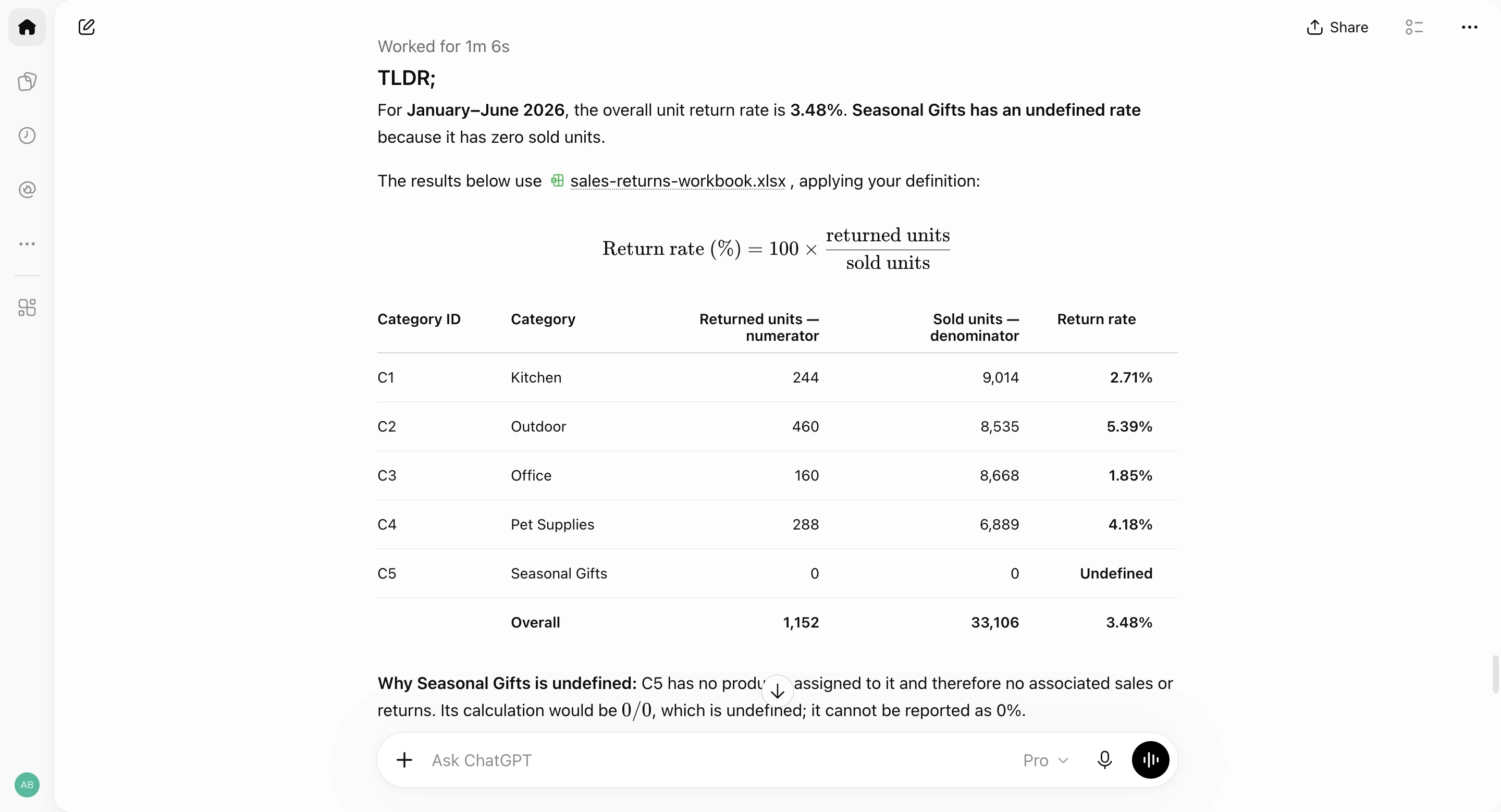
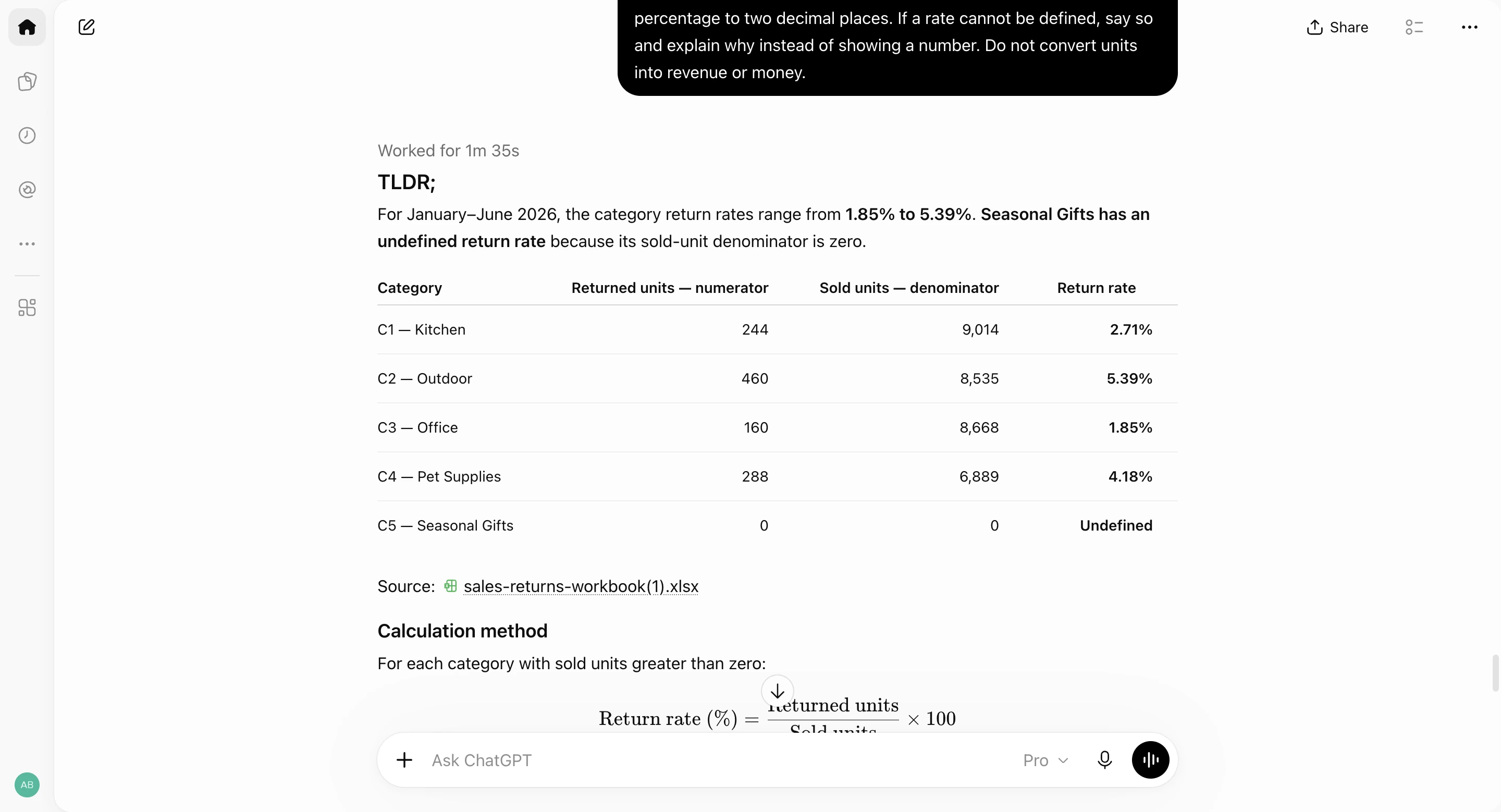
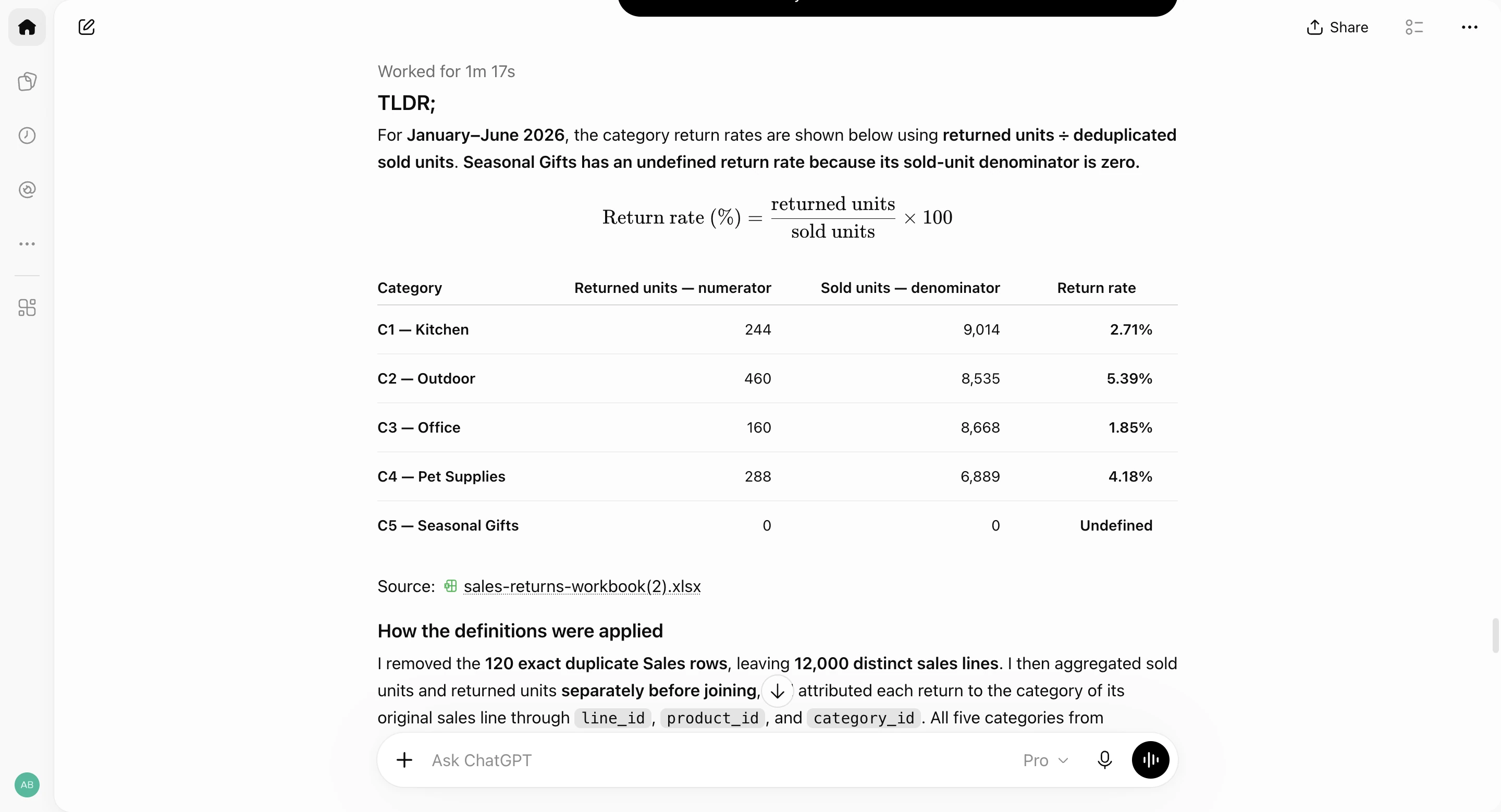
In all three runs ChatGPT produced the correct sales totals, return rates and chart, and the right numbers in its findings. In runs 1 and 2 the JavaScript it displayed for the sales tables imports a package that is not public, so it failed unchanged outside the app; in every run its final Python script ran unchanged and reproduced the downloaded CSV. The returned run-1 workbook held 50 formulas and a native chart (an editable Excel chart, not a picture); runs 2 and 3 held 40 to 50. In run 1, adding one unit to a retained sales line updated January's total, the grand total, the chart and the numbers in the finding sentences; the descriptive headings stayed fixed. The last message took about 27 minutes in runs 2 and 3, with steady activity throughout. Each record lists the usage figures and the model names the app reported.
ChatGPT, run 1: category return rates
ChatGPT, run 2: category return rates
ChatGPT, run 3: category return rates
ChatGPT can analyze uploaded Excel and CSV files, run Python calculations and create tables or charts. OpenAI's data-analysis documentation recommends reviewing the generated code, output and assumptions. Ask for the actual calculation and result file; check whether the tools are available in your model, plan and workspace.
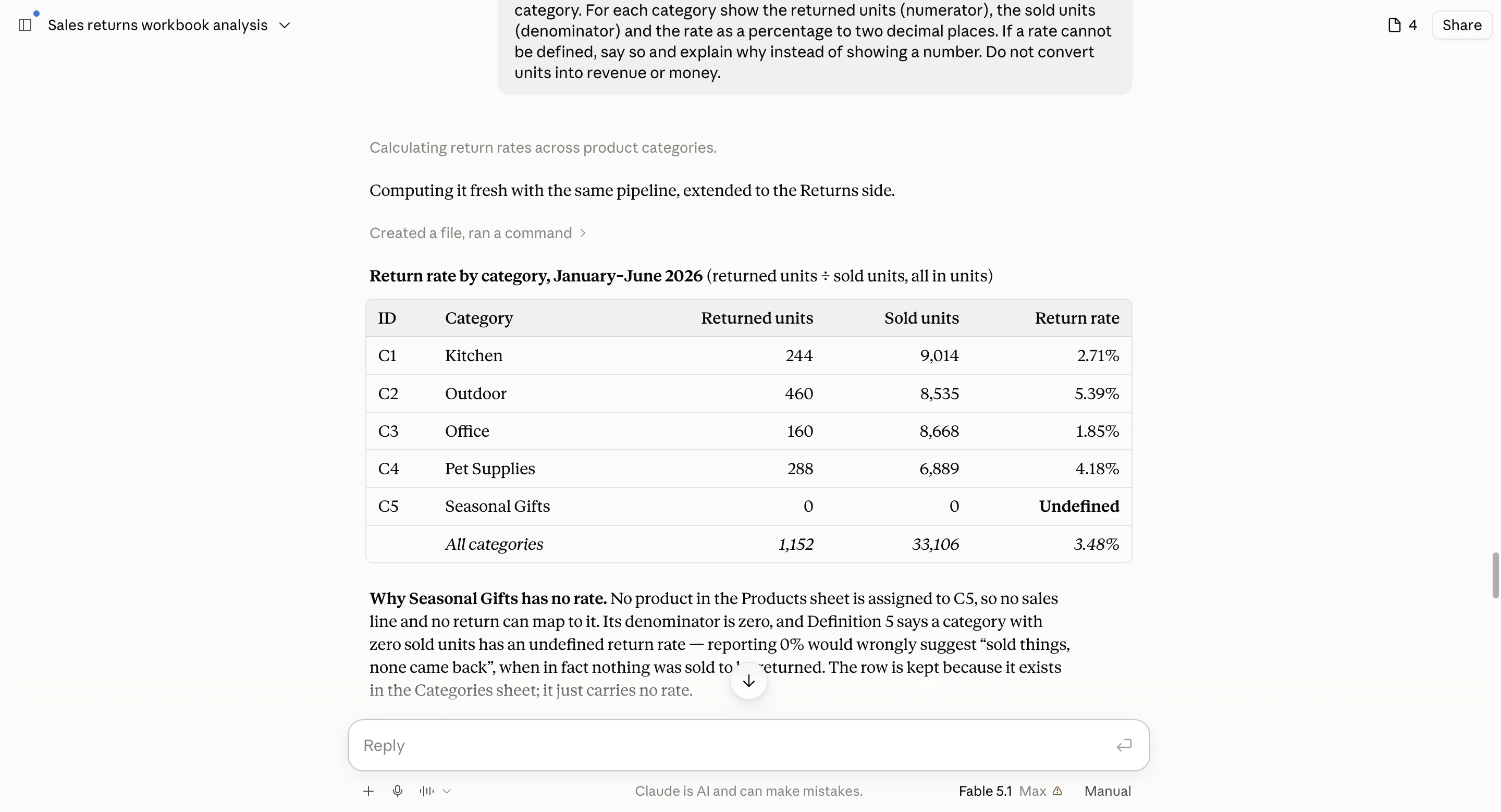
Claude's sales totals and category return rates matched the reference in all three runs. Its run-1 workbook contained formulas and a native chart; runs 2 and 3 returned workbooks with roughly 15,000 formulas and a native chart. In run 1 we added one unit to a source row on a copy and recalculated it in LibreOffice: January rose from 3,456 to 3,457, the grand total from 33,106 to 33,107, and the chart updated. The written findings stayed unchanged, so someone editing the data must also review the commentary. Two findings also contained wording we had to examine (see the list above). Its full Python scripts ran unchanged, but the short inline fragments in the chat text did not.
Claude, run 1: category return rates
Claude, run 2: category return rates
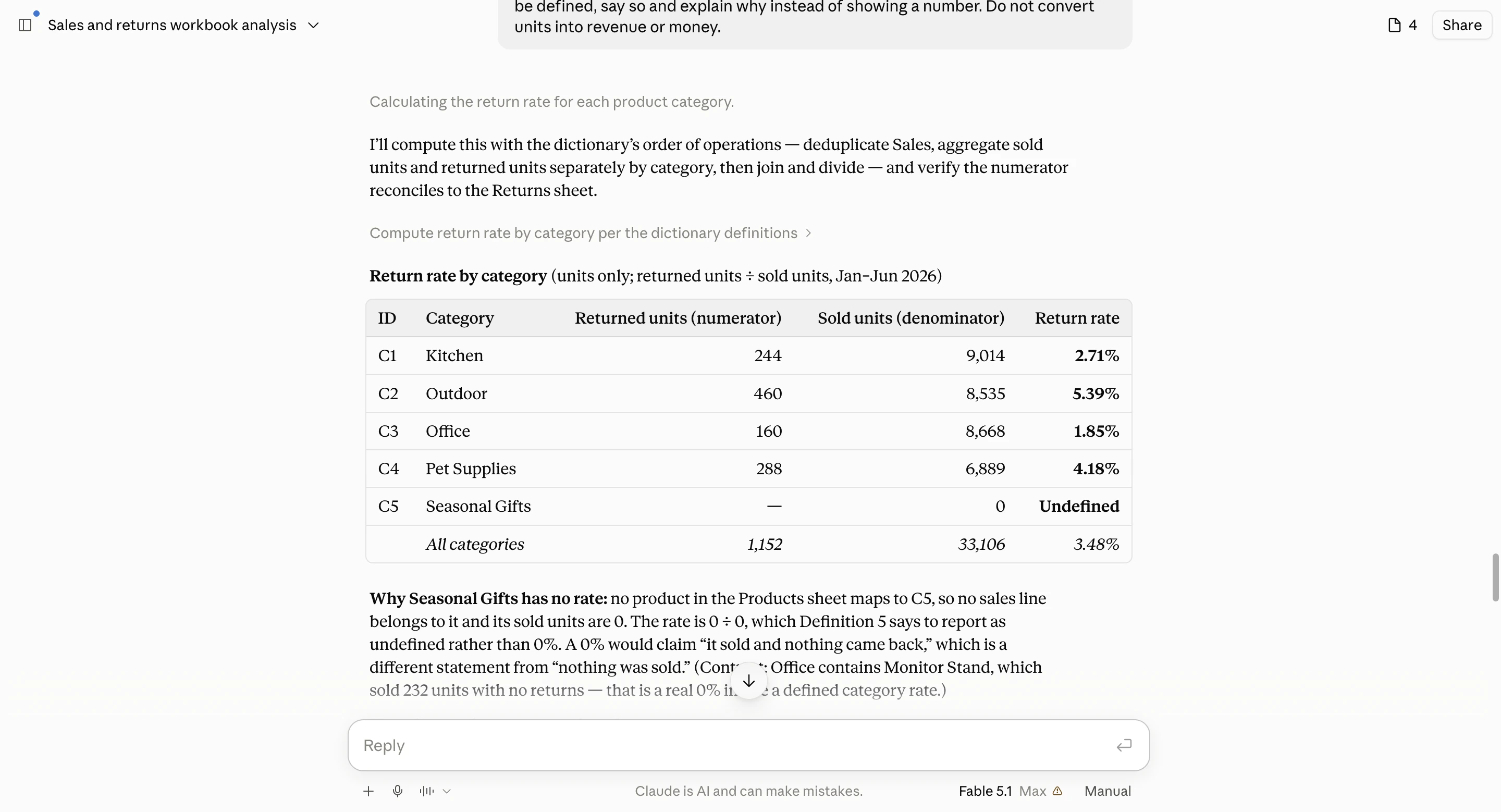
Claude, run 3: category return rates
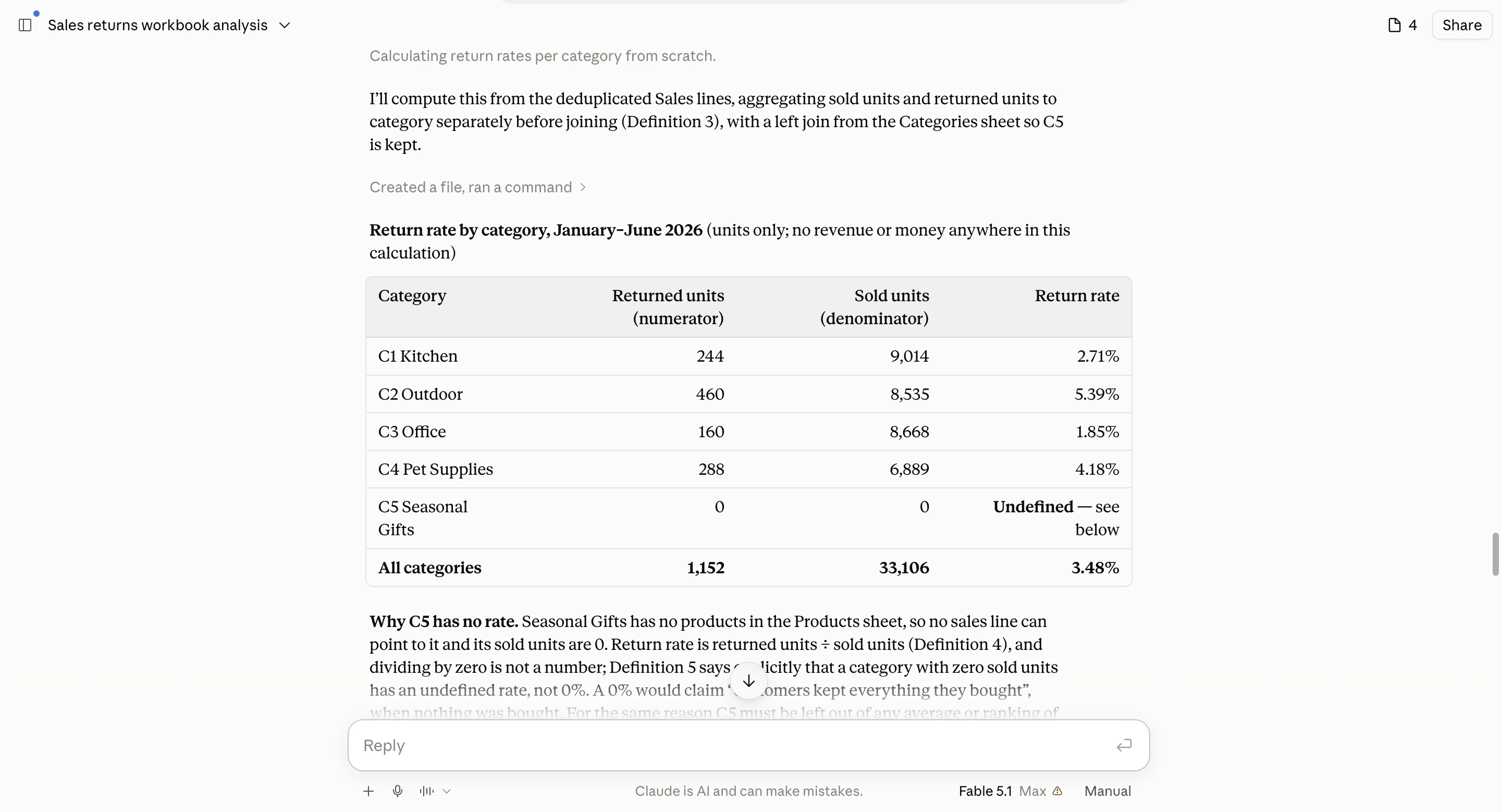
Claude's file documentation covers spreadsheet and chart creation across Free, Pro, Max, Team and Enterprise. Check that its file tools are available, then inspect the actual cells; file creation alone does not establish accuracy.
Gemini's first run got all 16 sales totals right but matched returns against the original Sales sheet, so the repeated sales lines counted some returns twice. Its run-1 workbook preserves that error and is labelled incorrect; use the reference values in the sample and checks package above for checked values. In run 2 a different step failed: a table summed to 20,800, although the total Gemini stated was correct. By run 3 the numbers were right and one finding was wrong. Its delivered workbooks held 10 to 23 formulas and a native chart but no stored results, so a file viewer that does not recalculate shows blank totals until the file is opened in a spreadsheet application. In one run the app's own preview drew a single bar, although the delivered PNG and workbook chart were correct.
Gemini, run 1: return rates with returns matched to repeated sales rows
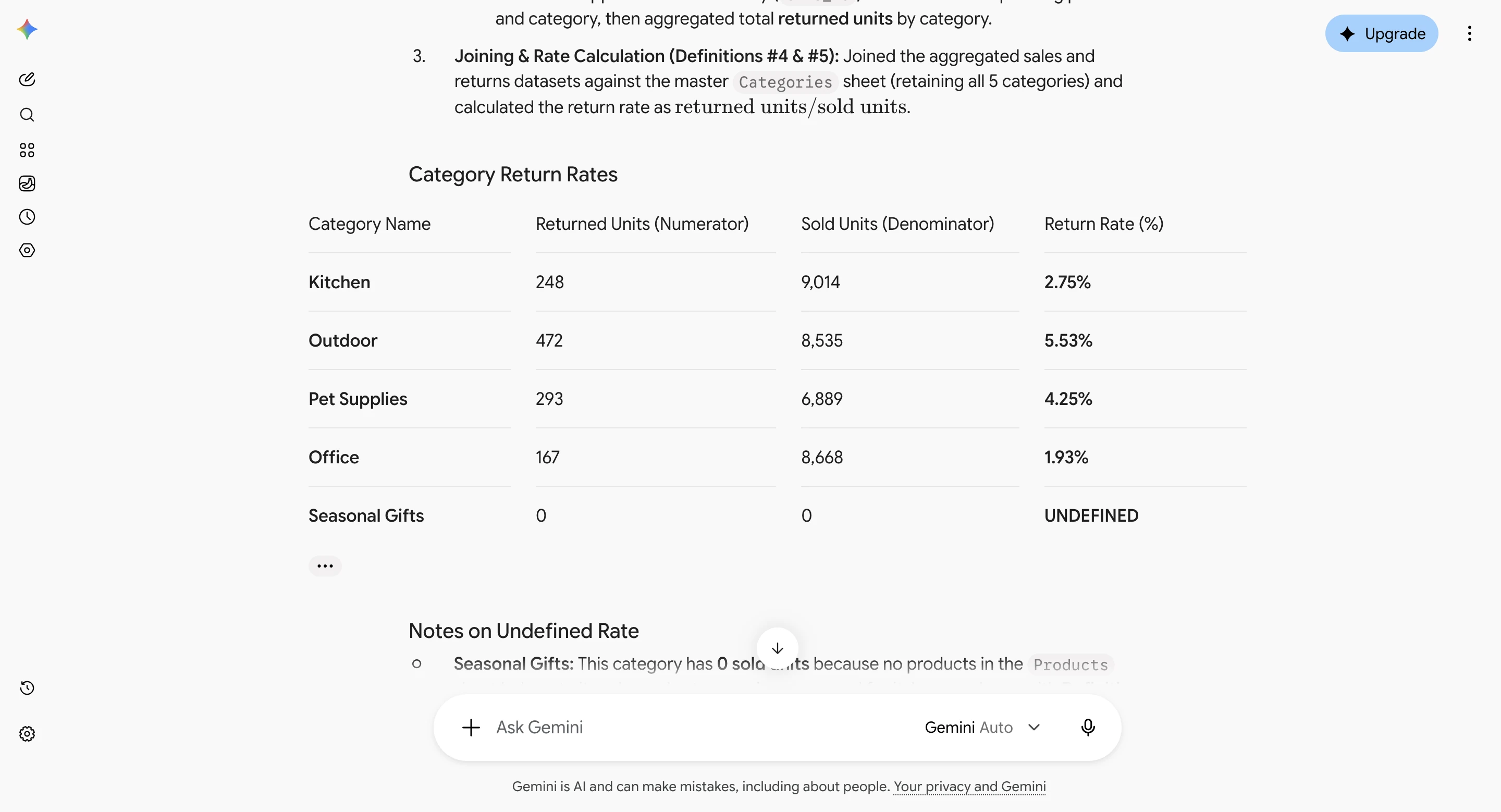
Gemini, run 2: a detail table that does not add up
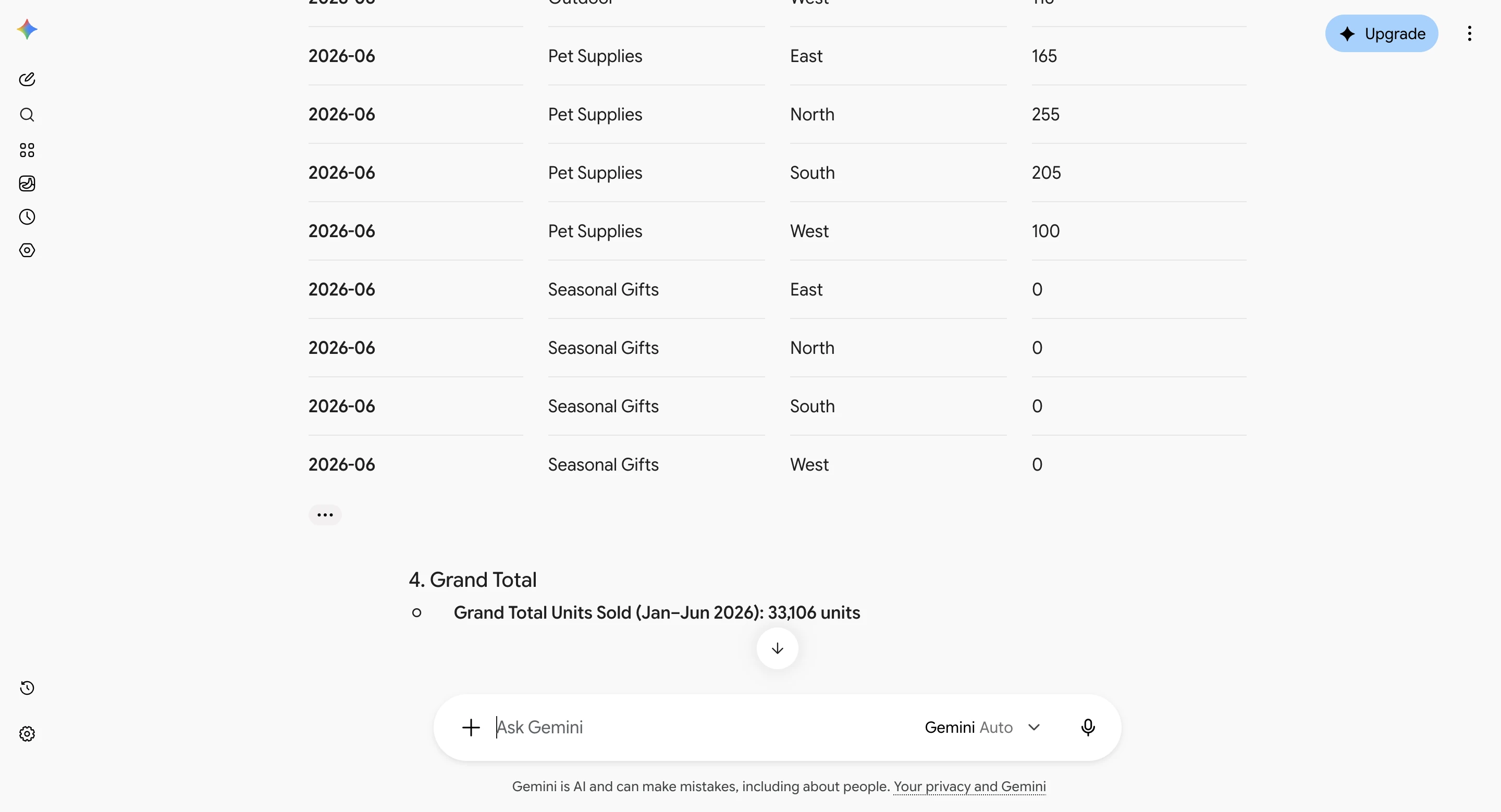
Gemini, run 2: category return rates
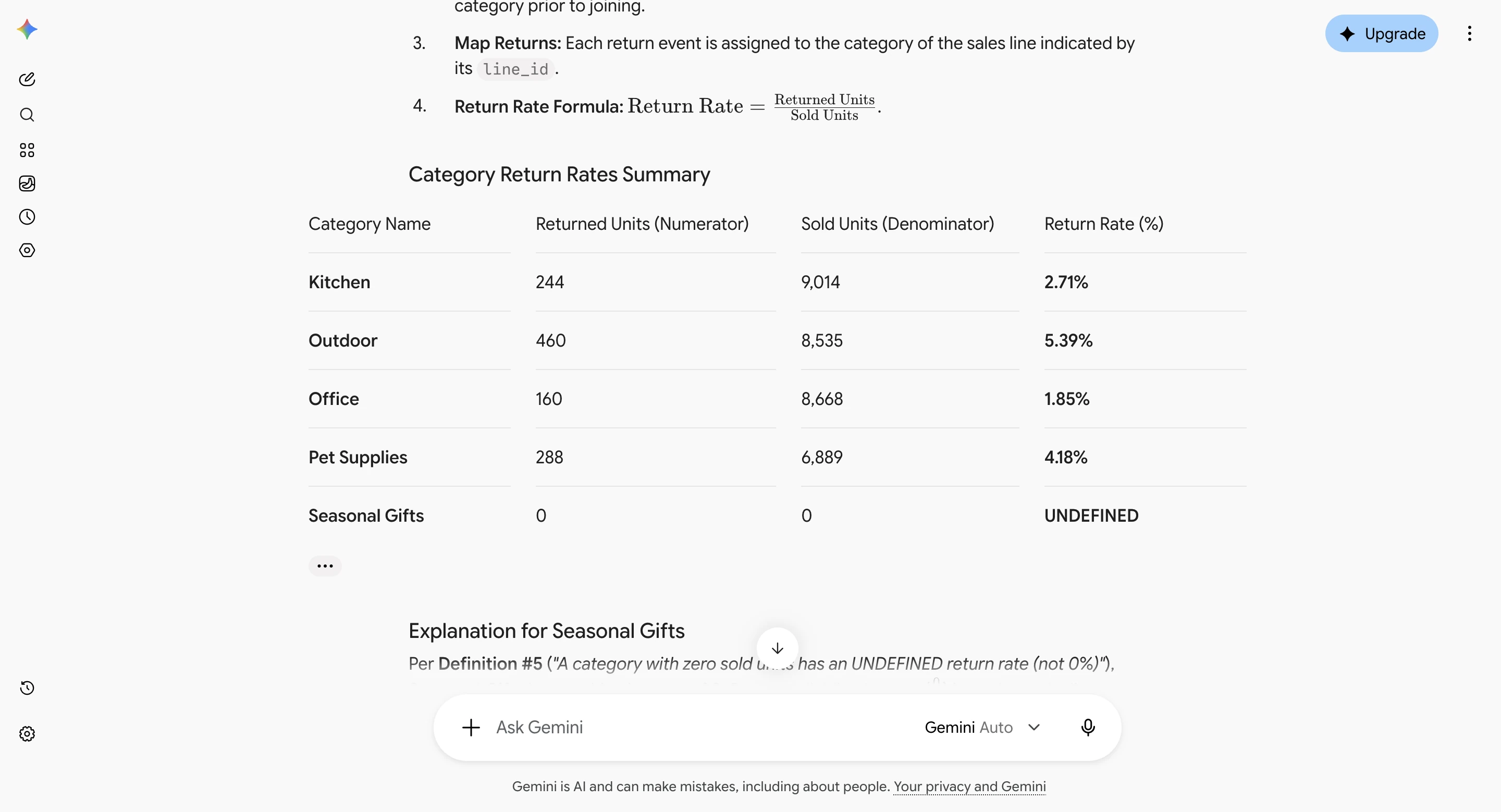
Gemini, run 3: category return rates
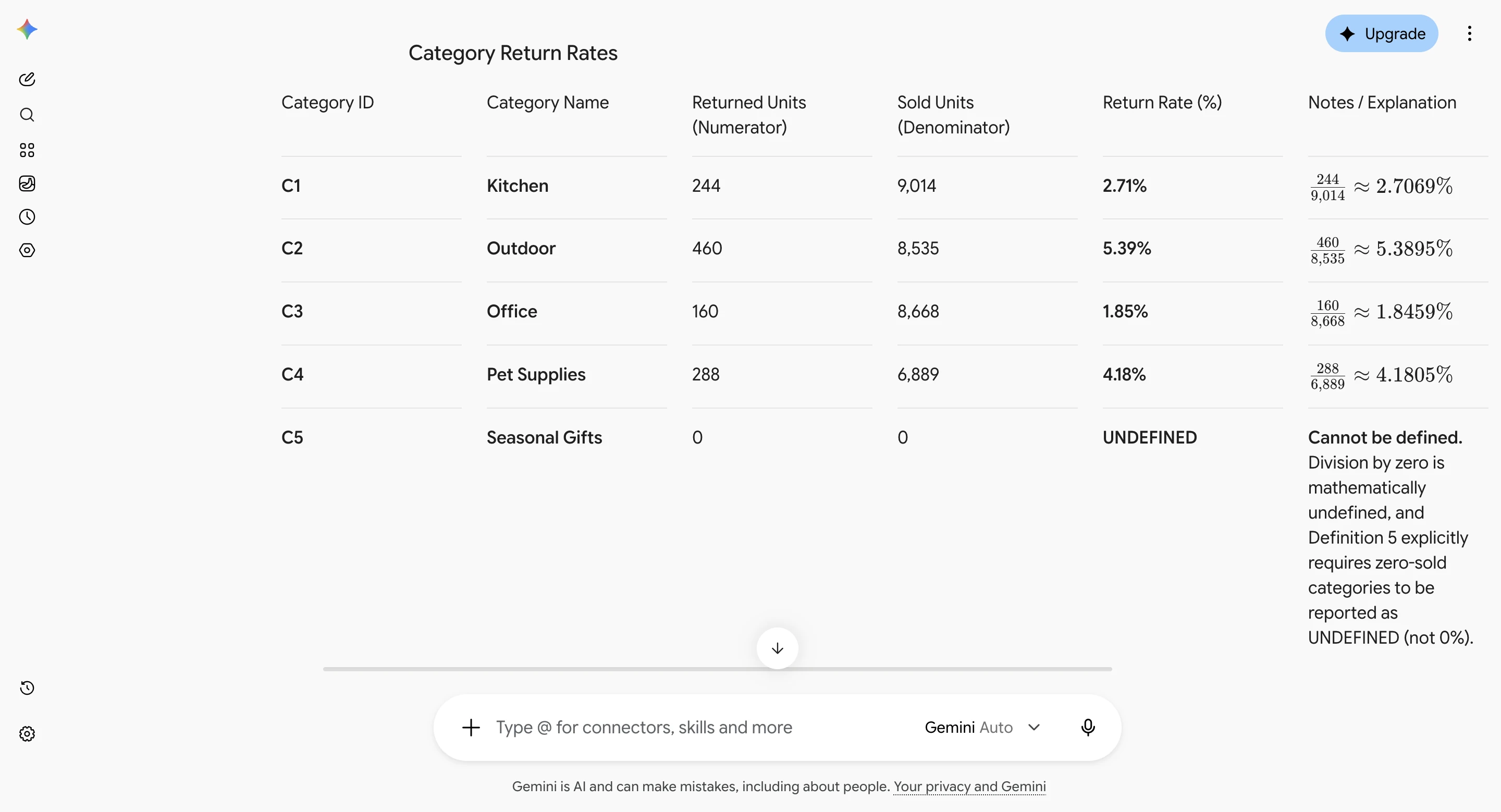
Gemini can generate graphs from uploaded spreadsheet data. Google's Gemini Apps documentation describes chart creation and editing. This browser app is separate from Gemini inside Google Sheets.
With the same workbook and prompts, all three apps reached correct sales totals in most runs, so the choice is less about arithmetic than about the work around it: how returns are joined to sales, whether the shown code runs, and whether the returned file recalculates. Claude's and ChatGPT's results changed little from run to run; Gemini's changed the most. This finding covers only these three app setups, on one workbook and one date. It does not rank the models underneath, and a different file, plan, prompt or week could change it.
Our earlier ten-tool accuracy test records a different set of runs and conditions. Its scores should not be combined with this test’s. For a wider choice beyond these three assistants, use the AI data-analysis tools comparison.
Choose the app whose returned file holds up when you reopen it: the expected sheets and categories, reconciled totals, meaningful percentages and the right dates.
A file with fixed numbers, a snapshot, can be useful, but a fixed total will not update when a colleague changes an input, and an image is not an editable chart object. To check promised formulas, change one controlled input, recalculate and compare with the expected result. Review the written findings separately.
| App | Formulas and chart | Stored results | After a one-cell change |
|---|---|---|---|
| ChatGPT | 40 to 50 formulas; one native chart | Run 1’s file did not save the chart’s values | Totals, chart and the numbers in the finding sentences updated; descriptive headings stayed fixed |
| Claude | 116 formulas in run 1; roughly 15,000 in runs 2 and 3; one native chart | Stored values were correct | Totals, categories, regions and chart updated; the written findings did not |
| Gemini | 10 to 23 formulas; one native chart | No stored results; totals and rates appear only after the file recalculates | Not scored, because Gemini never said the file used formulas. Changing one summary cell did update the chart and the rates that depend on it |
For a file you will hand over, the useful differences were whether the workbook carried live calculations back to the source rows, whether a viewer that does not recalculate showed numbers, and whether the written commentary needed a manual update. We did not test Microsoft Excel itself; the recalculation engine was LibreOffice Calc.
“ChatGPT for Excel versus Claude for Excel” can also mean add-ins operating inside the spreadsheet. This comparison concerns uploaded workbooks in the three browser apps. For native spreadsheet tools and their installation choices, see the Excel AI tools guide.
Official limits checked on 19 October 2026 help you plan an upload. They do not rank calculation quality or establish a large-dataset winner.
| App | Relevant documented limit | What to check |
|---|---|---|
| ChatGPT | Approximately 50MB for CSV files and spreadsheets, depending on row size. The Free plan allows three uploads a day, and limits may be lower at peak times. | Check your remaining allowance and how the file is laid out. OpenAI upload limits. |
| Claude | 30MB per file for upload or download in the documented file-creation workflow. | Check that file tools are on and how much plan usage is left. Claude file limits. |
| Gemini | 100MB for supported non-video files, with rolling upload and analysis limits. | Check that the whole file was used. Google upload limits. |
A context window is the amount of material a model can consider at once, not a spreadsheet row limit. Google warns that very large uploads can lose connections or details; OpenAI likewise says a successful upload can still yield incomplete analysis. Check counts and totals; a file the app accepted is not proof that it used every row.
The sample's correct sales total is 33,106 units. Adding every raw row gives 33,436 because repeated sales count twice. A plausible total or smooth chart can hide that difference.
The same repeats can inflate returns. Joining Returns directly to raw Sales would count 1,180 returned units instead of 1,152. Remove identical sales-line copies first, then calculate sales and return totals separately before combining them.
Check the denominator too: the quantity you divide by. Outdoor has 460 returned units and 8,535 sold units, so its return rate is 460 ÷ 8,535 × 100 = 5.39%. Seasonal Gifts has zero sold units; its rate is undefined. These are independently calculated reference values you can compare with the complete reference table.
Use these five checks before sending the report:
A useful final request: “Before I share this, reconcile the source total, your results table, your chart and the downloaded file. Show the numerator and denominator for every rate. List anything you could not calculate or export. Include the calculation I can rerun.”
If your company already uses ChatGPT or Claude, another analytics subscription needs to earn its place. When July arrives, can you reuse the definitions, inspect the new data and give colleagues an updated report? Compare the setup and checking work you would repeat each time.
A dedicated analytics tool such as Hex or Anomaly is worth evaluating if it reduces that work. Keep your existing assistant if it already handles the recurring job reliably. This test did not compare the apps' connections or scheduling.
If ChatGPT cannot finish the calculation or return actual charts, find out what stopped it: no access to code execution, a usage limit, an unsupported file or a failed export. Try the same task in another app with the missing capability, or run the supplied calculation in an environment you can inspect.
In a separate test on our development version of Anomaly, the same workbook produced monthly, category and region summaries that matched the reference, including the 33,106-unit grand total. The SQL it supplied ran unchanged and all 16 summary values matched; its Python depended on helper functions that exist only inside Anomaly, so it did not run elsewhere. The first export request stalled; after we stopped it and sent our pre-written recovery message, it produced a CSV and workbook with the correct monthly totals. The development account had added test credits, so this does not show what the ordinary Free allowance covers. The January–June test record keeps both attempts.
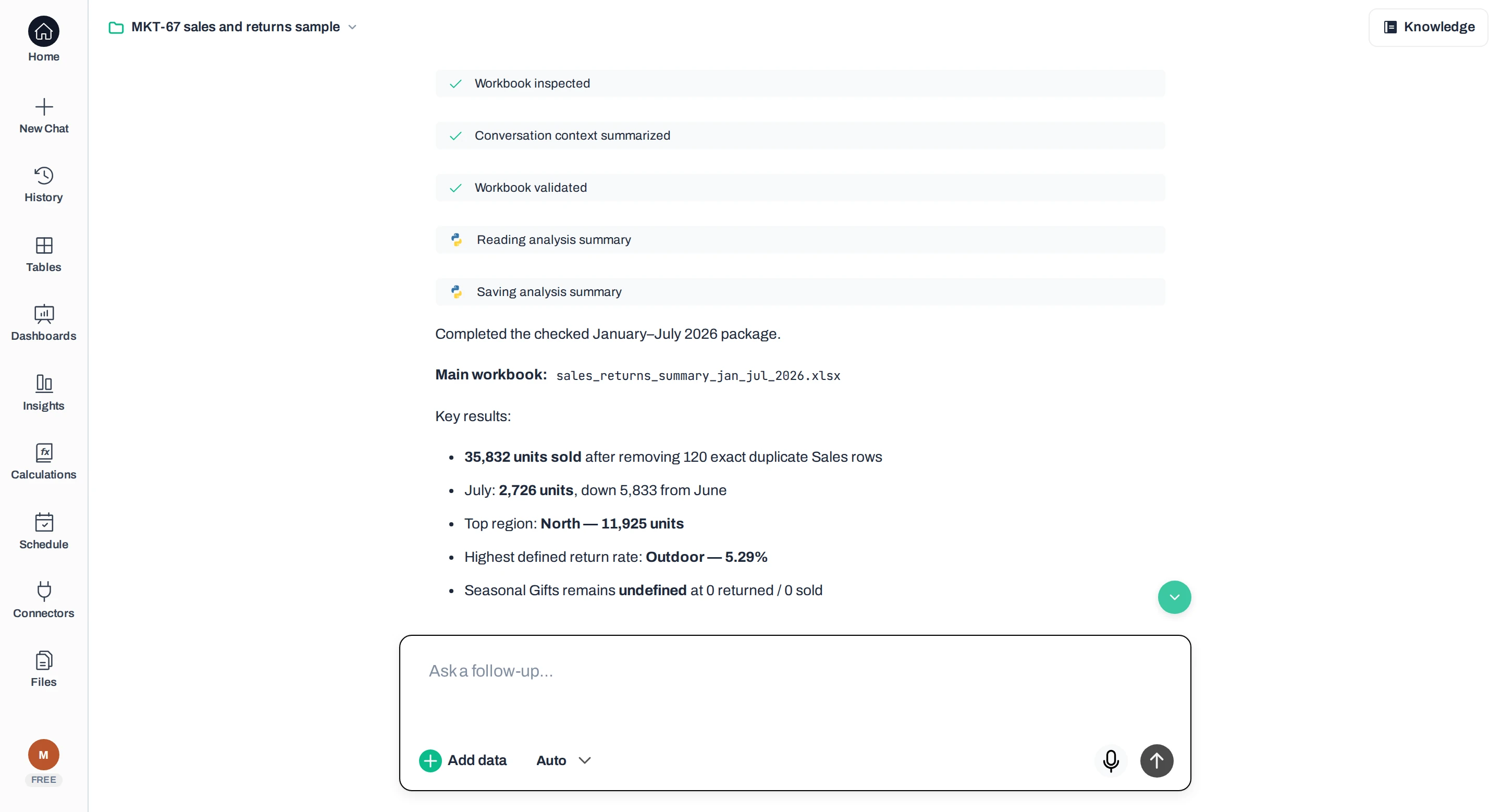
We then uploaded a separate July update and asked for a revised report in the same conversation. The new workbook matched the checked January–July totals: 35,832 units sold, 2,726 in July, with correct category return rates. We asked for this update after uploading the new file; Anomaly did not refresh or deliver it on a schedule. The update evidence records the request and files.
Anomaly: the requested January–July update
Try the sample workbook in Anomaly
We make Anomaly. AI agents operated the browser sessions and assisted with research, drafting and verification; the editorial byline does not imply that the named author personally ran them. This comparison comes from a vendor, not an independent evaluator.
All three can work with files you upload, but reading a workbook, executing a calculation and returning a usable spreadsheet are separate capabilities. Check the tools enabled in your account, then ask for sheet names, row counts, calculations and an actual download. A description of what a spreadsheet contains does not establish that every row was used.
Start with the highest reasoning setting that can execute code and work with your files. In our tests that meant ChatGPT GPT-6 at Pro effort, Claude Fable 5.1 at Max effort and Gemini Auto with High thinking on the free Gemini plan; those are app labels, not proof of which model answered. Record the label and your plan, then try the same task with known answers before changing subscriptions. A model that writes Python without running it has not completed the analysis.
No. A model upgrade can change the result, but so can the execution tools, instructions and data definitions. Save a small reference dataset, expected totals and a required output file. Rerun that task after an upgrade and inspect both the answer and the download. A correct result on one workbook does not establish the most accurate model for every analysis.
A free plan can be enough for a small task if its current file tools and usage allowance cover the work. An accepted upload, a complete calculation and a successful export each still need their own check. This comparison cannot establish a large-dataset winner: file-size limits and context windows are different constraints, and neither proves that every row contributed to the answer. Test a representative sample and reconcile full-data totals.
It addresses a business spreadsheet analysis, not machine-learning training or a benchmark of statistical inference. For a regression, hypothesis test or forecast, require an appropriate method, explicit assumptions and a calculation you can reproduce. Correctly adding sales units does not demonstrate that an app chose the right statistical test.
Founder, Anomaly AI (ex-CTO & Head of Engineering)
Abhinav Pandey is the founder of Anomaly AI, an AI data analysis platform built for large, messy datasets. Before Anomaly, he led engineering teams as CTO and Head of Engineering.
LinkedInContinue exploring AI data analysis with these related insights and guides.
We gave ten AI tools, including ChatGPT, Claude and Julius AI, the same sales data and checked every answer for accuracy.
Leaving Tableau as a small team? Match the replacement to which part of Tableau you keep and which cost, setup, or specialist burden you are trying to shed.
There is no single best Looker Studio alternative for GA4 reporting — the right move depends on the limit you have hit. A decision guide by constraint.