

Marketing Analytics
13 min
How to Export GA4 Data to Google Sheets
Export the report you need, refresh it when necessary, and check the numbers before turning it into a weekly traffic update.
Read More
Marketing Analytics — Guide · 2026
Follow a customer segmentation analysis example using RFM. Download the dataset, check refunds and duplicates, and build a customer review list.
 15 min read
A top-spender list tells you who spent the most. It leaves out whether those customers buy regularly, have stopped ordering, or returned part of a purchase.
Customer segmentation analysis adds those distinctions. This synthetic retail example groups buyers using recency (how recently they bought), frequency (how often they bought) and monetary value (spending after known refunds). Together, these measures are called RFM.
The groups below lead to different investigations: inspect a lapsed repeat buyer’s purchase history, distinguish a single observed purchase from repeat buying, or check a refund before treating low spend as weak demand. Each group leads back to named customer IDs so the next review can focus on specific records.
The corrected analysis accounts for 917 observed buyers, 2,500 distinct qualifying orders within the purchase window and $415,682 after known refunds. Another 83 customer records have no qualifying observed purchase history and stay outside these buyer totals.
| Customer group | Buyers | Value after known refunds (USD) |
|---|---|---|
| Recent repeat higher-value | 246 | $189,811.72 |
| Lapsed repeat higher-value | 120 | $83,826.65 |
| Recent one-order | 47 | $7,144.09 |
| Other recent | 170 | $61,507.62 |
| Other lapsed | 276 | $73,391.92 |
| Historical outside window | 57 | $0.00 |
| Zero-net refund review | 1 | $0.00 |
| Total | 917 | $415,682.00 |
The practice package supplies 1,000 customer IDs, 9,974 order-line rows, 101 refund records, expected outputs and verification scripts. It contains no real people or contact information. The steps below explain how the groups were built and what each one lets you investigate.
We ran both refund versions in Anomaly and compared the downloaded results with separate calculations. A $20 correction changes C0001’s value from $500 to $480 and its group from Recent repeat higher-value to Other recent.
Unzip the practice package into one folder. It provides these source tables and the field definitions in README.md:
customers.csv: one row per customer ID; 1,000 synthetic IDs.order_lines.csv: 9,974 raw merchandise lines, with source row, line ID, order ID, customer ID, order date, status and merchandise value in integer cents.refunds-v1.csv: 101 raw refund records, with source row, refund ID, order ID, refund date and refund cents.refunds-v2.csv: the replacement refund source containing the single R001 correction.Join orders to customers by customer_id and refunds to orders by order_id. Divide cents by 100 only for dollar presentation; keep the calculation in cents. Raw files intentionally contain duplicate, missing-key and conflicting records for the checks below. Keep expected-v1 and expected-v2 separate from your input files: they contain customer reviews, segment totals and exception results to compare against your own output. Reproduce v1 first, then replace the refund file and reproduce v2. The package is a transaction-analysis dataset; it supplies no demographics or churn-training labels.
Use purchase behaviour when your question is how customers have bought, and record the period before calculating anything.
Customer segmentation divides customers into groups for a purpose. Geographic segmentation uses location; demographic segmentation uses relevant personal characteristics; psychographic segmentation uses research into needs and motivations. This guide uses behavioural segmentation from transactions. It cannot establish why someone bought.
RFM means recency, frequency and monetary value. Shopify's RFM guide explains the broader method. Here, the snapshot is 1 October 2026 at 00:00 UTC. The 365-day purchase window starts on 1 October 2025 inclusive and ends on 1 October 2026 exclusive.
Calculate these measures for each customer:
M is “12-month order value net of known refunds,” not profit, lifetime value or accounting-period revenue. Older purchases remain available for recency and history checks; their refunds are reported separately from M.
Combine each order's legitimate merchandise lines before calculating customer measures and assigning one group per buyer.
A qualifying purchase must be completed_paid, belong to a valid customer and have consistent customer, date and status fields. Its merchandise value must be positive, after discounts and before tax or shipping. Cancelled orders and purchases on or after the snapshot do not count.
C0001 has two qualifying purchases in the window:
| Order and purchase date | Merchandise lines | Order value |
|---|---|---|
| O001A, 15 May 2026 | $180 + $120 | $300.00 |
| O001B, 15 August 2026 | $160 + $100 | $260.00 |
The original refund against O001B is $60, posted on 20 August. C0001 therefore has R47, F2 and M$500: 47 days since purchase, two orders rather than four lines, and $300 + $260 − $60.
Accepted refunds must be positive, link to a qualifying observed order, and fall on or after purchase but before the snapshot. Combine partial refunds against their intended order and subtract them once. A refund does not create a purchase or reset recency.
A completed, fully refunded purchase still contributes to R and F under this example's purchase-event convention. If your business excludes such purchases, document that choice and recalculate consistently.
For grouping, “recent” means R≤90 days; “repeat” means F≥2; “higher-value” means M≥$500. Apply the first matching rule below, after separating customers without qualifying history:
| Precedence | Buyer rule | Group |
|---|---|---|
| 1 | F=0, with older qualifying history | Historical outside window |
| 2 | F≥1 and M=$0 | Zero-net refund review |
| 3 | R≤90, F≥2 and M≥$500 | Recent repeat higher-value |
| 4 | R>90, F≥2 and M≥$500 | Lapsed repeat higher-value |
| 5 | R≤90 and F=1 | Recent one-order |
| 6 | Any remaining buyer with R≤90 | Other recent |
| 7 | Any remaining buyer | Other lapsed |
These illustrative thresholds depend on buying patterns, not a universal retail standard. Exactly 90 days is recent; 91 is lapsed. Exactly two orders and $500 meet the repeat and value thresholds. Tied measures receive the same group.
R47/F2/M$500 retain days, orders and dollars. Conventional RFM scoring converts each measure to a rating, often 1–5. Where 5 means most recent, most frequent or highest spending, 555 combines three top ratings. CleverTap's RFM explanation describes this approach. This example uses fixed thresholds, not percentile scores or five equal-sized groups.
Before the correction: buyers and no-history records stay distinct
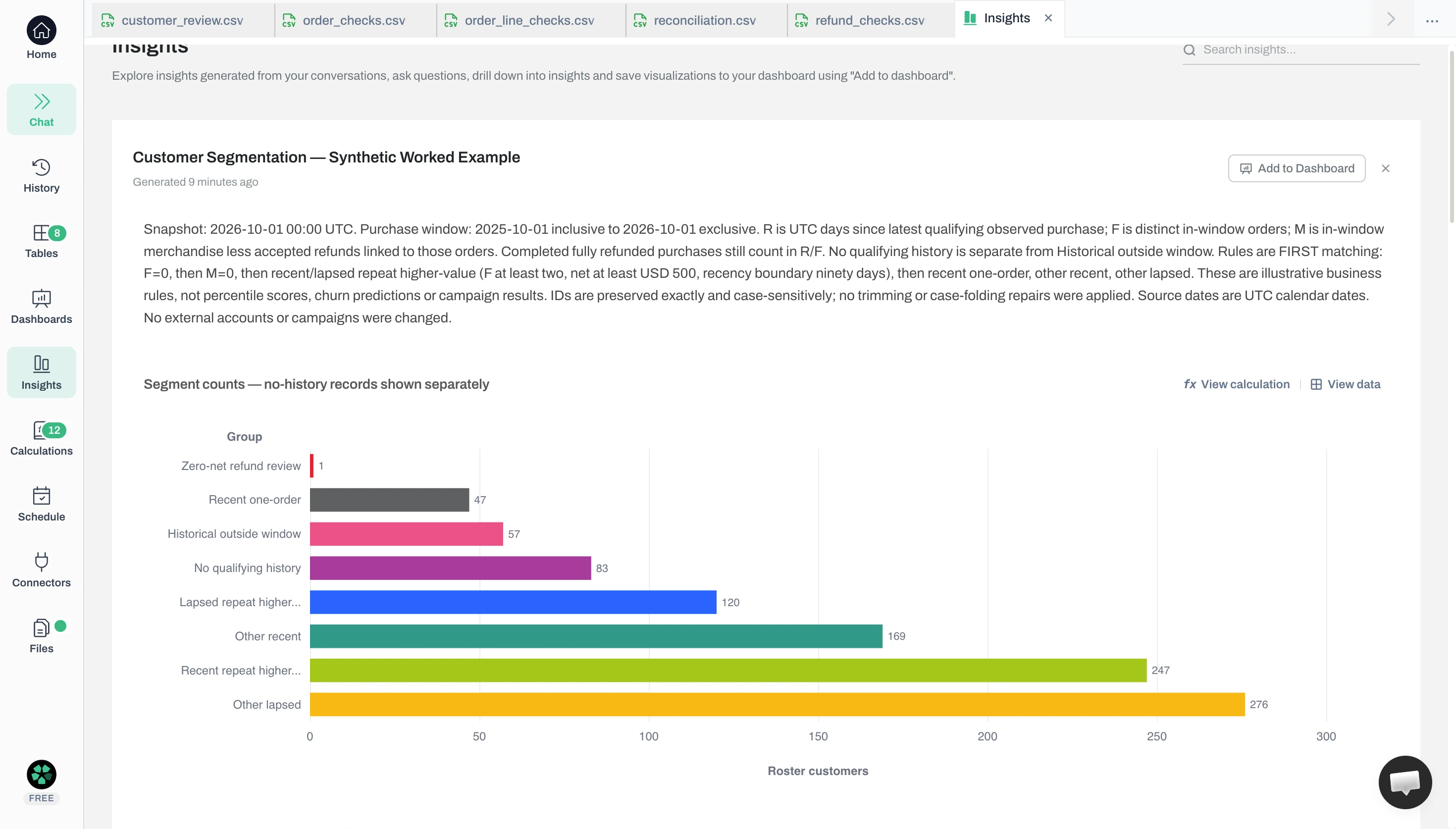
Inspect exceptions before treating a customer's spend or group as final, then reconcile the eligible orders, customers and money.
Compare source keys. Customers have stable IDs; order lines have line, order and customer IDs; refunds have refund and order IDs. Match orders to customers and refunds to qualifying orders. OORPHAN refers to absent customer C9999; OBLANK has a blank customer ID; RUNMATCH refers to absent order O404. Keep these exceptions visible rather than guessing a match.
For a spreadsheet check, copy the two ID lists into one worksheet: list A in A2:A1000 and list B in B2:B1000, with headers in row 1. For example, A contains customer IDs from orders and B contains the customer master. Import IDs as text to preserve leading zeros, remove unintended spaces, and use the same case convention in both lists. Keep the original columns for an audit.
=$C2="Missing from B", and choose a fill colour.C2: =IF(A2="","",IF(COUNTIF($B$2:$B$1000,A2)=0,"Missing from B","Present"))
D2: =IF(B2="","",IF(COUNTIF($A$2:$A$1000,B2)=0,"Missing from A","Present"))Extend the ranges for longer lists. With A containing C0001, C0002 and C9999, and B containing C0001, C0002 and C0007, the results must flag C9999 from A and C0007 from B. A blank stays blank. Repeated IDs test membership only; they do not establish equal quantities. These formulas use COUNTIF with the example’s alphanumeric IDs; COUNTIF ignores case and treats * and ? as wildcards in other kinds of keys.
Apply the same check to refund order IDs versus qualifying order IDs. C9999 and O404 require investigation; a customer absent from the order list may simply have no qualifying purchases. The Excel missing-records guide covers further list-comparison cases.
Distinguish duplicates from separate items. Repeated order IDs can represent legitimate lines. For the identical repeated line O015A-L1, the recorded survivor rule keeps source row 41 and removes row 43; the genuine second line survives. Conflicting line IDs quarantine every affected order. Inconsistent order headers, blank or unknown customer IDs and nonpositive order values are also excluded and logged.
Excel’s Data → Remove Duplicates keeps the first occurrence in the current row order. The columns you tick define a duplicate; the remaining columns do not decide which row wins. Work on a copy and add an OriginalRow column before sorting so the survivor remains traceable.
In this example, identical O015A-L1 rows 41 and 43 retain row 41 under the earliest-source rule. Row 42 has a different line ID and stays. Sorting only the key column would detach IDs from their amounts; selecting order ID as the key would discard genuine items. See the duplicate-removal guide for other survivor rules.
Validate refund records. Identical repeated refund IDs count once; conflicting IDs are quarantined. If otherwise eligible refunds exceed an order's value, quarantine all candidates for that order. Keep unmatched, pre-purchase, snapshot-date and other rejected refunds visible. An unresolved real refund makes the affected value provisional.
Inspect rejected records before trusting the totals
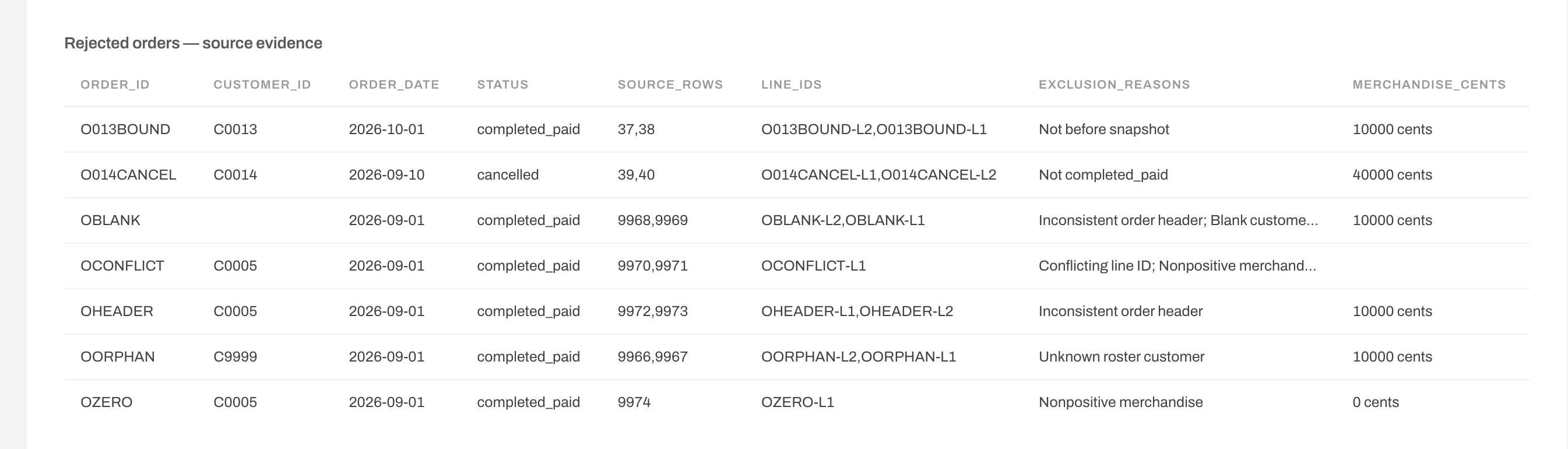
Three zero-value cases require different dispositions:
| Customer | Observed evidence | Disposition |
|---|---|---|
| C0006 | Purchased 30 September 2025; R366/F0/M$0 | Historical buyer outside the window |
| C0007 | No qualifying observed purchase; blank R/F0/M$0 | No qualifying history; outside buyer groups |
| C0008 | Fully refunded purchase; R21/F1/M$0 | Zero-net refund review |
Zero spend alone does not imply a refund. Check C0006's older order, C0007's history coverage and C0008's linked full refund against their source IDs.
Reconcile the first version. The 1,000 customer records split into 917 buyers and 83 without qualifying history. There are 4,980 qualifying observed orders, including 2,500 in-window orders. In-window merchandise of $417,394.11 minus accepted refunds of $1,692.11 gives $415,702.00. Orders, customer totals and group totals must agree; they are views of the same money, not amounts to add together.
Keep the snapshot and rules fixed so you can explain exactly what one source correction changes.
Replace refunds-v1 with refunds-v2: R001 changes from $60 to $80. Never append both. This corrects the synthetic source export; it is neither new purchasing activity nor an AI calculation error.
C0001's M becomes $480, while R47 and F2 stay unchanged. The Recent repeat higher-value group loses its original $500 and one buyer. Other recent gains the revised $480 and one buyer. Total value falls by only $20 to $415,682; buyer count stays at 917.
A $20 refund correction changes the customer’s group
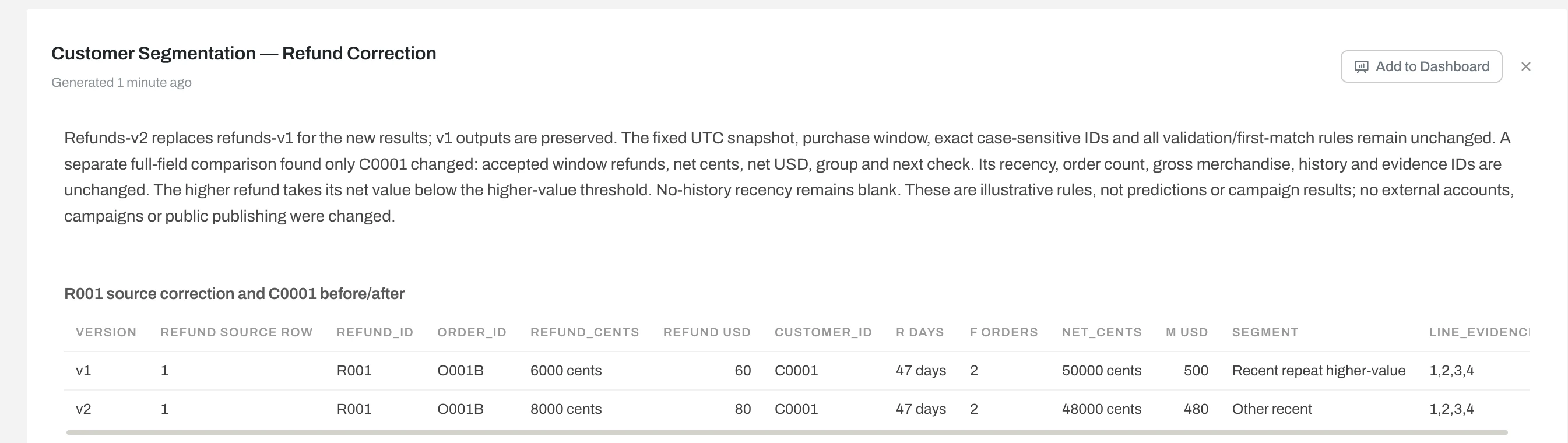
How it was checked: Both Anomaly exports agree with separately implemented calculations on all 1,000 customer rows across nine material fields, 4,980 qualifying observed orders, 96 accepted refunds and every group total. A separate comparison of all exported customer columns finds changes only for C0001: refund/value fields, group and suggested next check.
The download's JavaScript and SQLite implementations, plus 20 fixed-case checks per version, are offline checks. They were not those product runs. The article owner wrote both implementations; agreement shows consistency, not proof that every source record or business assumption is correct.
Use the list to decide what to check, keeping the source evidence beside each customer before taking action.
The corrected review contains customer ID, last purchase, R/F/M, qualifying-history status, refund flags, group and next check. These examples suggest different investigations:
Check the customers behind the group labels
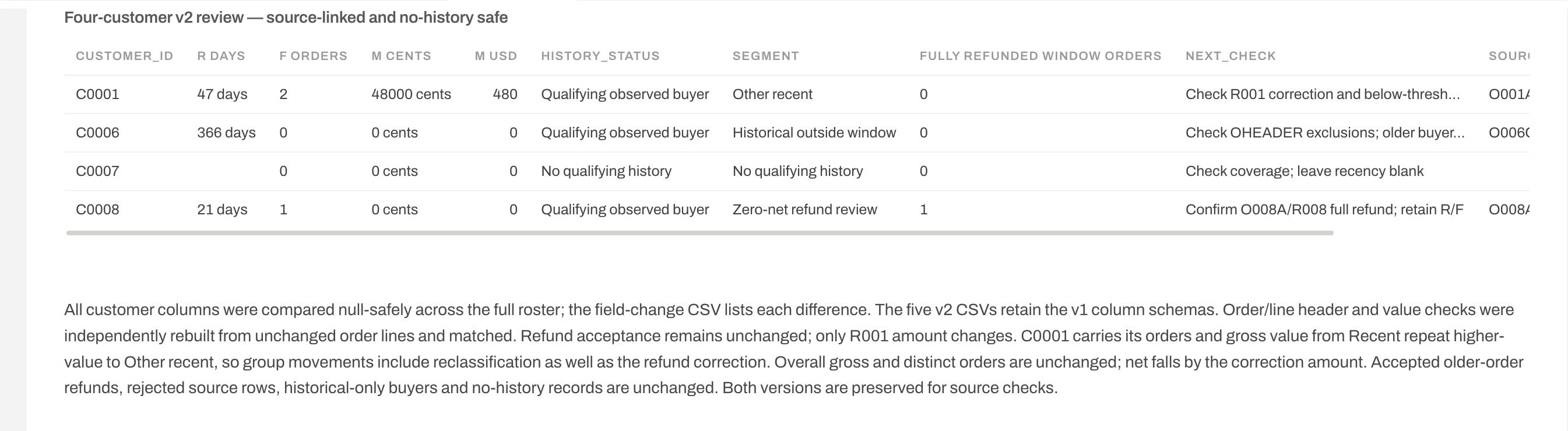
These are hypotheses for investigation, not guaranteed campaigns or permission to contact anyone. Low net value can reflect refunds rather than low purchase activity.
Begin with a written definition of loss. In a subscription business, use the agreed cancellation or expiry event. For this retail example, an illustrative operational rule is “no qualifying purchase for more than 90 days,” provided the export covers those days and the interval fits the product’s normal buying cycle. That labels observed inactivity; it does not prove a customer will never return.
For a separate arithmetic illustration, if 100 known customers are active at the start, 15 are inactive at the end and 85 remain active, period-end customer churn under that rule is 15 ÷ 100 = 15%. Twenty new customers acquired during the period do not change it. These illustrative counts are not results from the RFM dataset; its single snapshot cannot establish that starting cohort or a measured churn rate.
Customer churn indicators to investigate: recency exceeding the usual repeat-purchase interval; fewer distinct orders across equal-length periods; and reduced purchase value. Check each against seasonality, incomplete exports and refunds before interpreting it. A recorded cancellation is stronger evidence in a contractual business; complaints or service problems require their own records. C0002’s 214-day gap warrants review, while C0001’s $20 fall is a refund correction, not changed purchasing activity. The customer churn analysis guide develops the wider retention workflow.
Use the practice package to repeat the analysis, inspect its evidence and test the controlled refund replacement. Our verified run used GPT-6.1 Sol Low (Foundry).
Upload only customers.csv, order_lines.csv and refunds-v1.csv into your example project. Keep expected outputs, calculation scripts and the verifier outside the product inputs.
Inspect the imported order lines
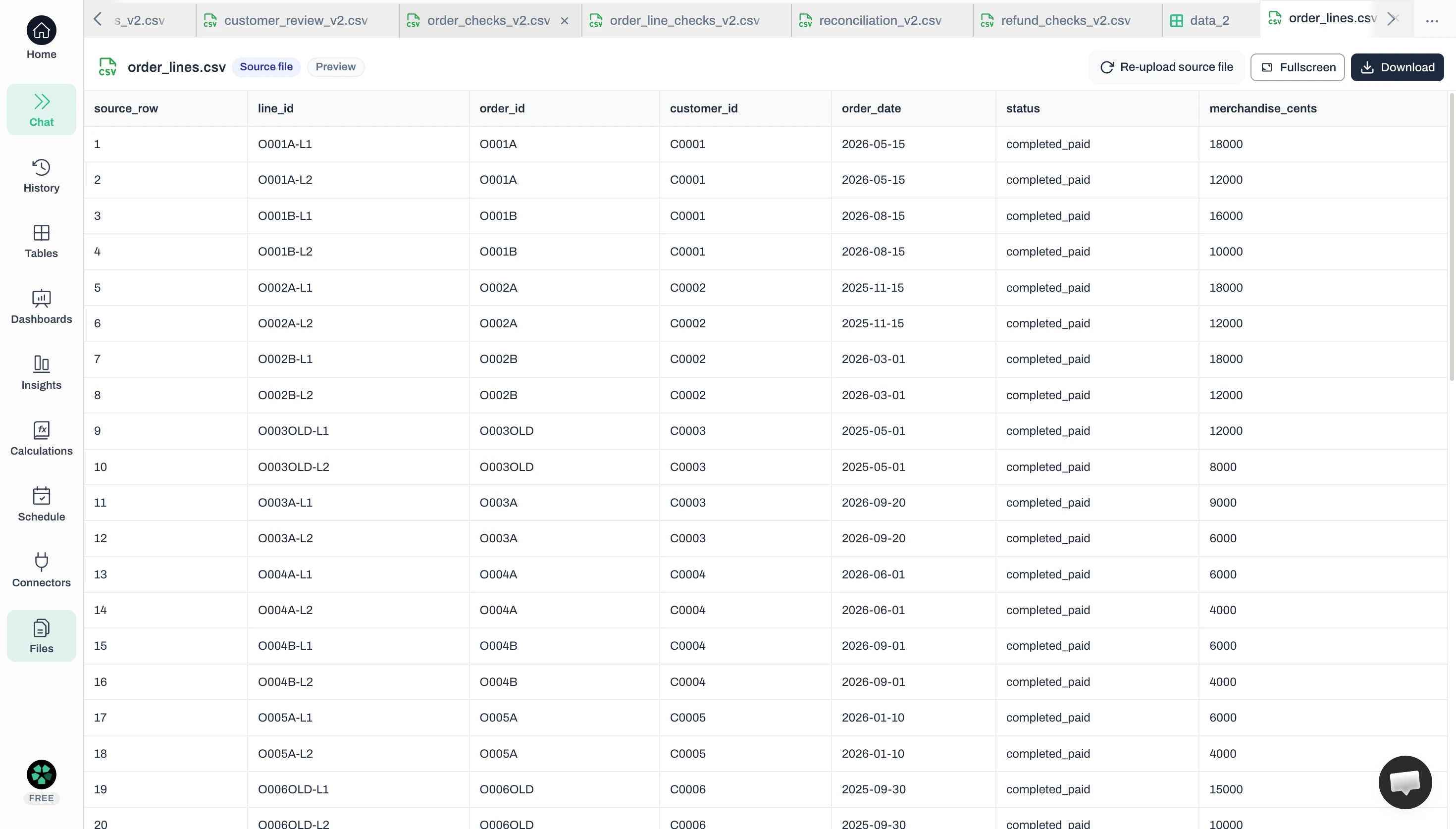
The following prompt is condensed from the actual run. Use it with the definitions and precedence table above; the full recorded instructions preserve the detailed rules.
Analyse these synthetic customers, order lines and refunds at 2026-10-01 00:00 UTC, with purchases from 2025-10-01 inclusive to 2026-10-01 exclusive. Use completed_paid, positive-value orders and valid customer IDs. Preserve legitimate lines; keep the lowest source_row for exact duplicate lines and quarantine orders affected by conflicting keys or headers. Accept only positive, correctly linked refunds posted on/after purchase and before snapshot; quarantine conflicting refund IDs and over-refunds.
Calculate R from latest qualifying observed purchase, F from DISTINCT window orders and M after accepted linked refunds. Keep full-refund purchases in R/F and no-history recency blank. Separate no-history records, then apply the first matching buyer rule: F0 historical; M0 refund review; R≤90/F≥2/M≥$500 recent repeat higher-value; R>90/F≥2/M≥$500 lapsed repeat higher-value; recent F1; other recent; other lapsed. Export customer measures, groups, exceptions and a source-linked next-check list. Reconcile orders, customers and group totals.
Inspect the generated customer measures, groups, exceptions and review list. Download the customer, order, line, refund and reconciliation CSVs. Compare them with the separate expected outputs, including the three zero-value cases and duplicate survivor. Do not accept a chart as a substitute for checking rows.
Compare the saved source versions
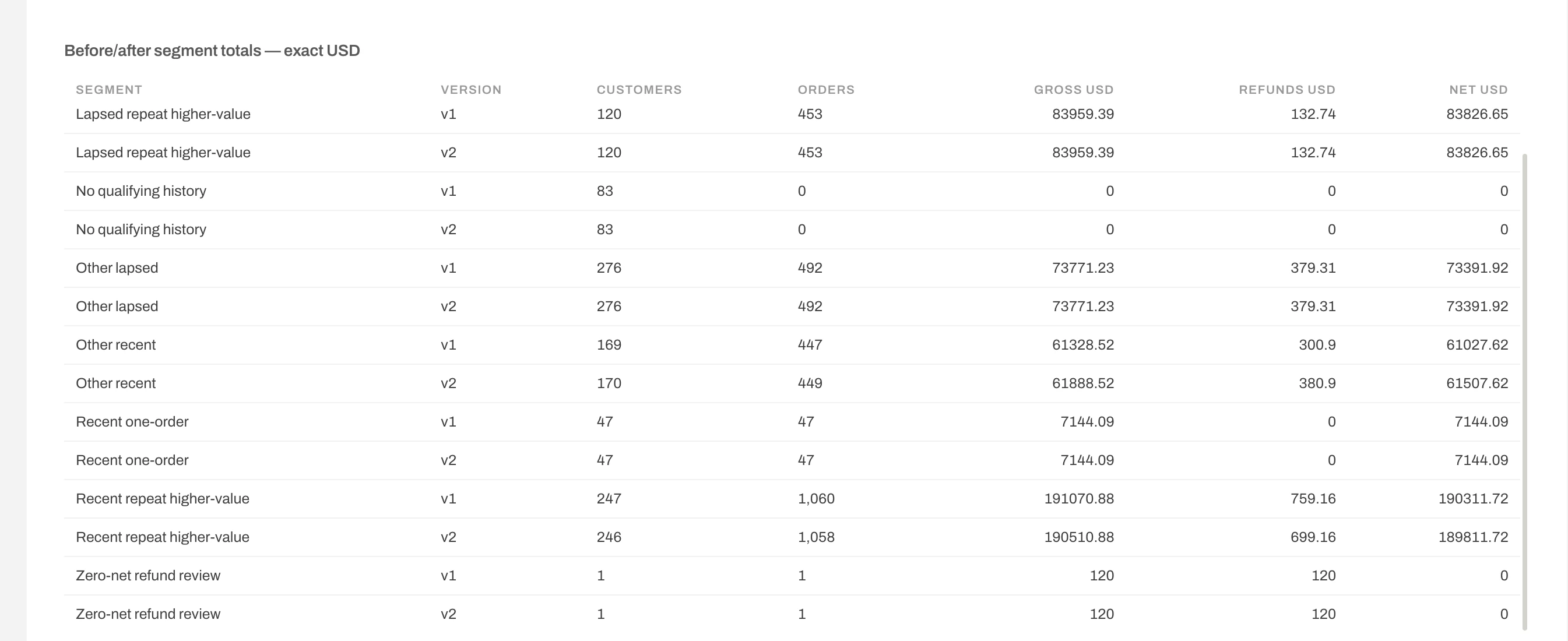
Upload refunds-v2.csv and explicitly use it instead of v1. Preserve v1 outputs and request a full customer-row comparison with unchanged dates and rules. The recorded correction prompt specifies that replacement. Confirm the C0001 change and the corrected group totals shown above.
Before handing over the review, confirm that someone can trace its date, rules, source exceptions and customer evidence. Check that counts and money reconcile, the replacement has not doubled refunds, and the proposed follow-up fits buying patterns, margin and contact permission.
It supports reproducing this specific transaction-based analysis. The download includes source files, field definitions, expected customer and segment results, and a verifier. It does not include demographic research, a machine-learning notebook or labels for training a churn model.
Use thresholds that fit your decision and purchase cycle. Compare plausible alternatives before adopting them, and preserve the rules with each result. Changing thresholds changes membership even when source data stays fixed. This example does not establish which thresholds improve campaign results.
Say that recency and previous purchases are only observed within those records. A customer absent from the export may be an older buyer. You cannot distinguish that person from someone who never purchased without additional history. Avoid lifetime or first-ever labels.
First separate new activity from source corrections. Advancing the snapshot changes recency and can move orders outside the window. Preserve the previous inputs and rules so you can explain those movements. The controlled correction above kept the date fixed specifically to isolate one changed refund.
Upload the three practice files and build your RFM review list in Anomaly. Use the recorded rules, inspect the exported rows, then replace the refund source and compare the customer changes before using your own data.
Founder, Anomaly AI (ex-CTO & Head of Engineering)
Abhinav Pandey is the founder of Anomaly AI, an AI data analysis platform built for large, messy datasets. Before Anomaly, he led engineering teams as CTO and Head of Engineering.
LinkedInContinue exploring AI data analysis with these related insights and guides.
Export the report you need, refresh it when necessary, and check the numbers before turning it into a weekly traffic update.
One weekly marketing question, asked from Claude Code through Anomaly’s MCP server and traced to its SQL and rows, with the daily-users trap worked out in the open.

A worked campaign performance analysis on a downloadable Google Ads and GA4 sample: make the two sources agree, compare CPA and ROAS, test for noise, and decide what to scale, fix or cut.